A USD Viewer Without Kit: The Cost of Separate Stages
Pradeep Kaushik·Jul 2, 2026·Build Note·7 min read·Updated Sep 10, 2026
In this article 7 sections
I could edit a USD prim from the browser, save it and watch the stream go black for about two seconds while the renderer reloaded. The edit had worked. Getting it into the rendered scene was the awkward part.
I built this viewer to test whether standalone Omniverse libraries could support an interactive tool without Kit. Rendering and streaming worked, but my editing code and the renderer held separate copies of the scene. That choice affected every edit, the hierarchy browser and the session overrides.
This is the version I tested. A newer shared-stage library is now available, which changes what I would build next; I have not migrated and rerun this application on it yet.
The rendering ran on a single AWS EC2 g6e.2xlarge, one NVIDIA L40S (48 GB), and I drove it from a Mac in a browser. The browser received RTX-rendered frames over WebRTC and needed no Omniverse installation or local RTX renderer.
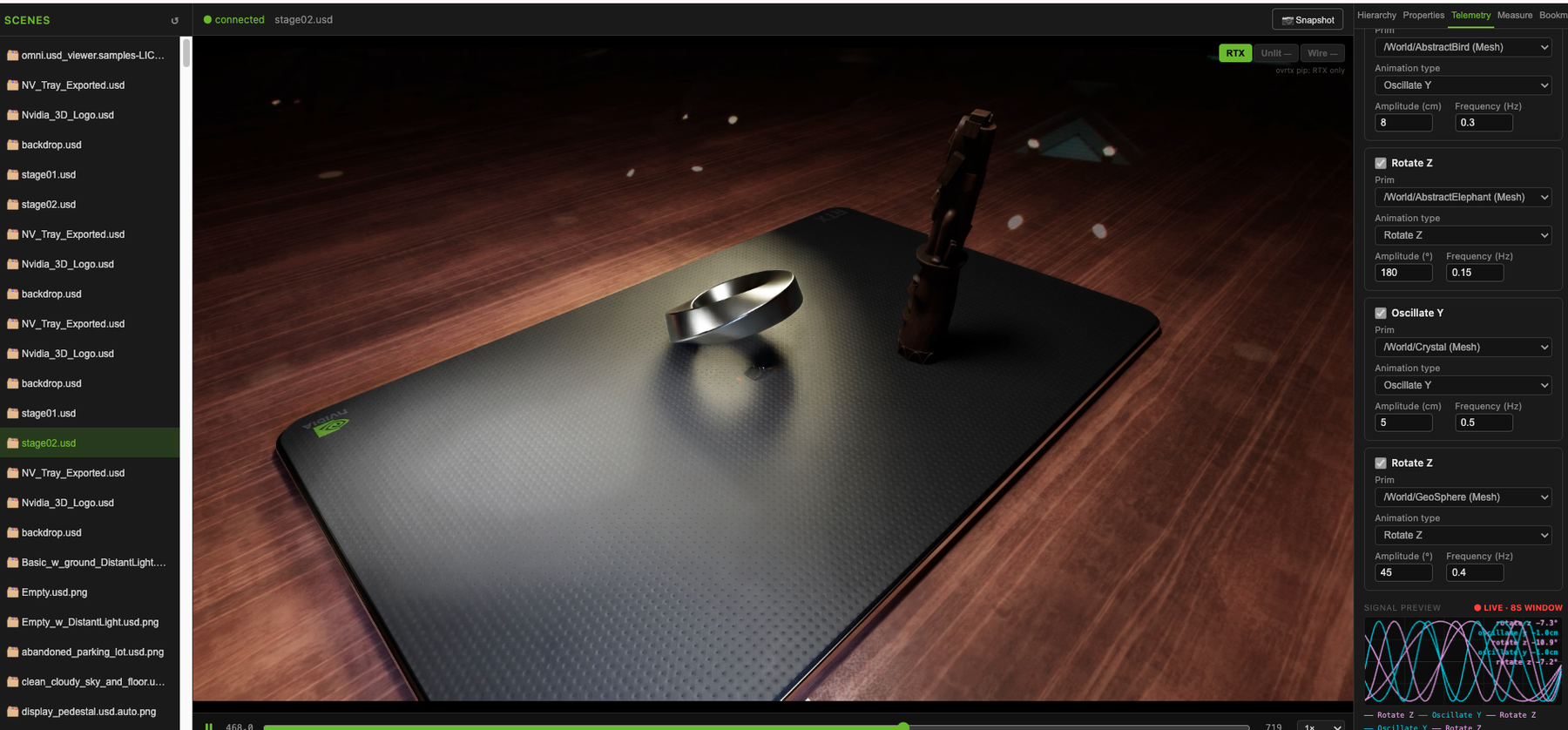
Telemetry in the browser. The L40S renders the USD stage on the server. The browser holds the scene list, motion bindings, signal preview and playback controls.
The short cut below moves through one browser session: inspect and edit a prim, measure between two prims, save a camera position, configure telemetry, and then play the stage live.
A 52-second cut from the original browser recording; the interface and interactions are unchanged. Watch the full 4½-minute demo.
The stack
Everything runs as plain Python and a normal npm frontend, no .kit file, no extension, no app to launch:
ovrtx: the RTX renderer. In the version I built against, it loaded a USD stage internally and rendered a frame every time I called step().
ovstream: the WebRTC server. Handles signaling, the data channel for camera/input events, and the actual video pipeline.
warp-lang: a small GPU kernel to convert the renderer’s RGBA output to BGRA before it hits the stream encoder, entirely on-GPU, no CPU round-trip.
pxr (usd-core): the open-source USD library for reading the prim hierarchy and editing attributes in the source stage. My application separately generated USDA for temporary authoring and baked animation.
React + TypeScript + Vite on the frontend, talking to the server over a plain REST API.
Inspection became editing
The first useful version let me choose a stage, navigate the scene, keep camera bookmarks and inspect prims. Those reads could use the USD file on disk. The harder test came when I added writes.
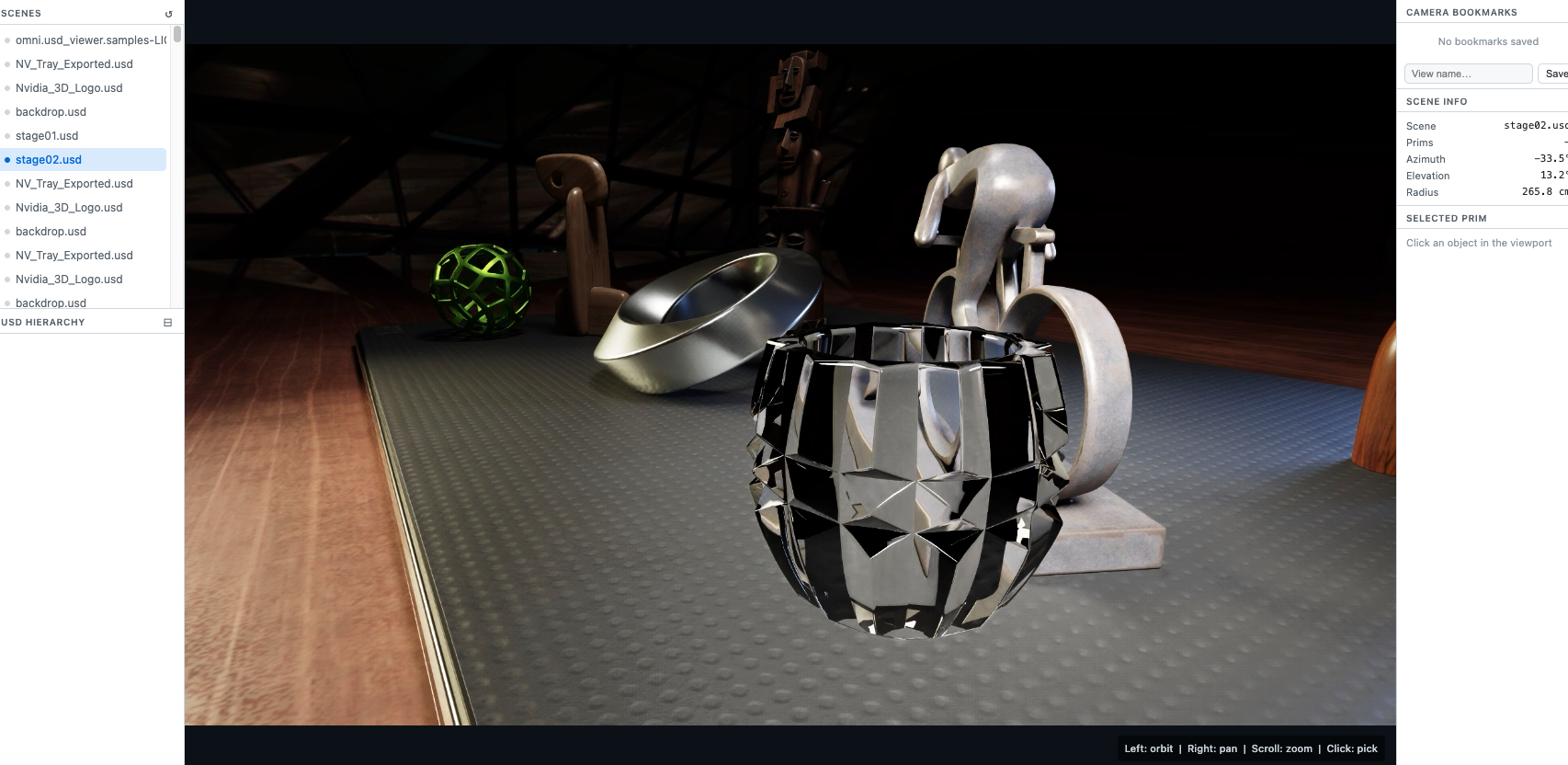
Scene navigation. The early interface put stage selection, the live RTX view, camera bookmarks and scene information in one browser window.
Creating and deactivating prims, undoing edits and playing telemetry-driven animation meant the visible scene could differ from that file. I kept the commands on the server and exposed them over REST, so another client could use the same operations. That kept the browser simple, but it left the server responsible for making its inspection results agree with the renderer.
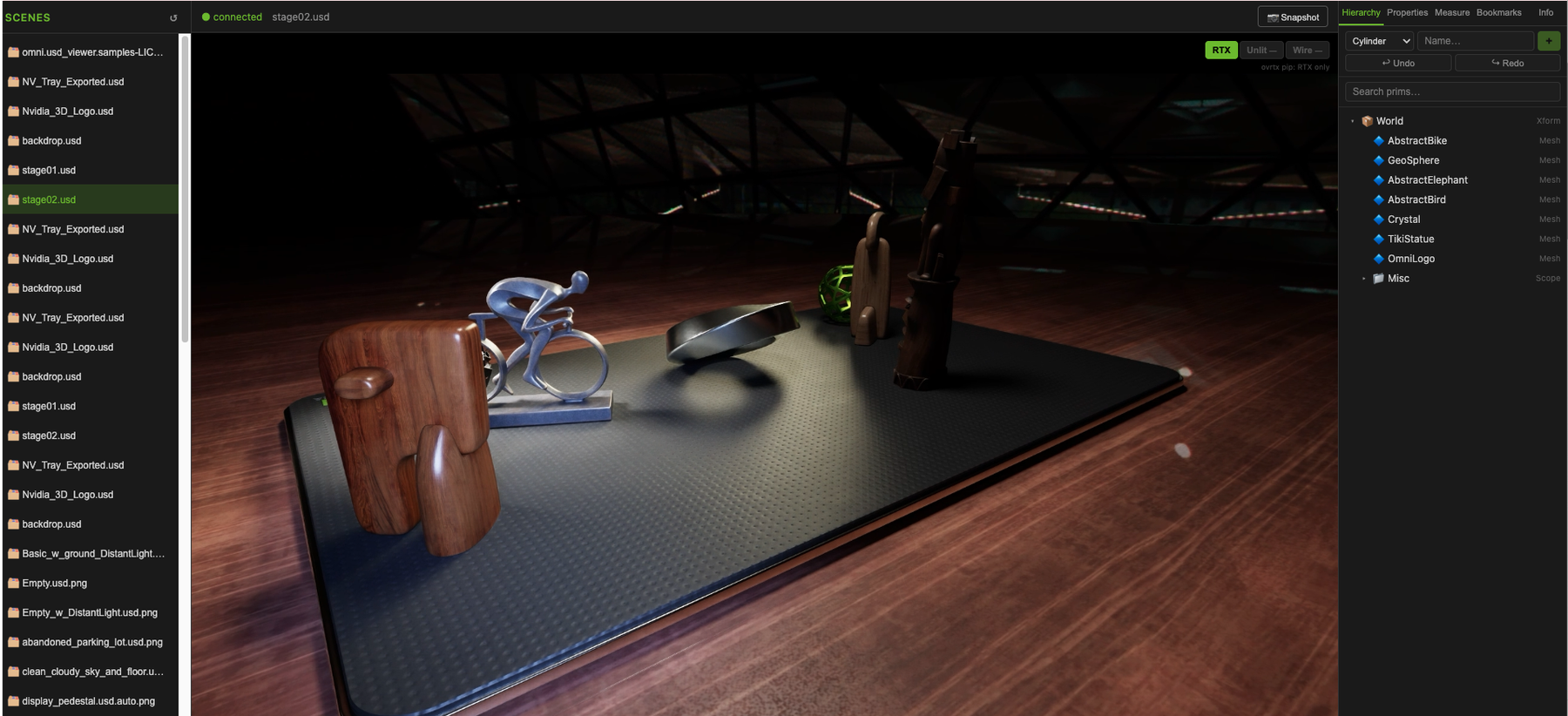
Session authoring. The same browser surface grew to include the USD hierarchy, primitive creation, undo and redo, render modes and snapshots. Those controls call the server APIs; they do not edit the stage locally.
Architecture
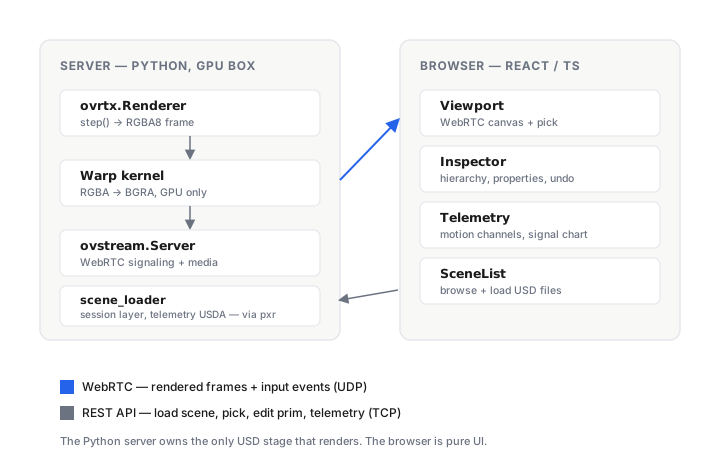
The Python server is the only thing that touches the USD stage and the only thing that renders. The browser is pure UI: it sends commands over REST (load scene, pick a pixel, edit a prim) and receives rendered frames plus server events over WebRTC. Nothing runs client-side except the React app.
An edit had to cross two copies of the scene
The single biggest architectural cost in the version I built was that pxr and ovrtx held separate stages. pxr opened the USD file on disk; ovrtx kept its own in-memory copy for rendering. Edits to the source stage went through a file round-trip:
# pxr writes to its own copy of the stage, not ovrtx'sstage = pxr.Usd.Stage.Open("/path/to/scene.usda")prim = stage.GetPrimAtPath("/World/Table")prim.GetAttribute("xformOp:translate").Set(Gf.Vec3f(1.0, 0.0, 0.0))stage.GetRootLayer().Save()# ovrtx has no idea anything changed until you force it to reloadrenderer.open_inline_root(usda_string) # ~2 second blink in the stream
Dragging a transform slider made the stream blink. Session edits added another problem: I generated USDA for temporary prims and overrides, then loaded it with the source scene. The hierarchy browser still inspected the original file, so a newly created prim could render without appearing in the tree.
I had described this as a missing session-layer API outside Kit. That was too broad. OpenUSD already provides GetSessionLayer() and edit-target APIs. The limitation was how I connected my editor to this version of the renderer. My string-generation path was an implementation choice, not a requirement of standalone USD.
Telemetry made that choice expensive to debug. I baked 720 frames into a timeSamples block; malformed generated USDA could leave the animation absent without a useful error in the viewer. The public loader inspected for this revision passes the string straight to the renderer. I would require a parse check before loading it, followed by a check that the expected prim or animation is actually present. The earlier description overstated this by saying that validator was already in place.
Scroll sideways for more columns.
Choice in this build
Consequence I had to handle
Inspect and edit a separate pxr stage
Saved edits needed a renderer reload; the stream blinked for about two seconds
Keep temporary authoring in generated USDA
Inspection of the original file missed newly created session prims
Bake telemetry as text
The loader still needs explicit syntax and post-load scene checks
In a Kit application, omni.usd.get_context().get_stage() gives extension code access to the managed USD stage. My standalone build had no equivalent connection between its editor and renderer. Removing the Kit application also meant taking responsibility for that connection.
What changed since I built it
As of this September 2026 review, ovrtx 0.4 integrates with ovstage, a standalone library for shared runtime scene data and changes. Both are pre-release software. The application owns the ovstage instance and decides when each library reads or writes it. The renderer-owned stage APIs I used remain available in 0.4 but are deprecated.
So the two-stage architecture above is still an honest record of the build, but it is no longer the architecture I would choose now. If I rebuilt it, the application would own one ovstage instance, ovrtx would render from it, and ovstream would deliver the result to the browser. That is much closer to the clean separation I wanted in the first place.
The migration still needs testing in this application. I would check whether edits reach the rendered scene, whether inspection sees session changes and whether reconnect works before saying those problems are resolved.
Restarting was part of the test too
An overlapping restart hung both renderer processes in my test. I had started a second server before killing the first. I now check that the old process has stopped. I did not isolate why they hung, so I would test concurrency separately before sharing a GPU between viewers.
Cold shader compilation took about 90 seconds for the scenes I used; warm restarts took about 15 seconds. I wait for the server-ready message before treating a blank browser as a failure.
A reconnect could return black frames. The public server now stops and recreates ovstream after a disconnect while keeping ovrtx alive. That avoids another renderer warmup. A failed stream restart can still require a manual server restart; a browser refresh alone does not reset server state.
My Python 3.13 environment rejected the UsdTokens import. Using UsdGeom.Tokens resolved it. I would check the installed USD API before attributing that to Python itself.
What I would test before using this architecture
For a mostly read-only viewer, loading a scene and streaming it may be enough. For live authoring, I would first create a prim, change it, find it again through the hierarchy and undo the change while watching the rendered result. Then reconnect the browser. Those checks exercise the state that a static render leaves untouched.
I would run them against the shared-stage path before adding more controls. The recorded build shows that an interactive viewer can run without Kit, and also how much application work appeared when editing and rendering disagreed about the scene.