You No Longer Need to Build an App to Use Omniverse
Pradeep Kaushik·Jun 24, 2026·Untangle·7 min read·Updated Sep 21, 2026
In this article 7 sections
If you learned Omniverse by building a Kit extension, standalone libraries change the starting decision for your next project. You can now choose how much of the application framework to use, including for some interactive tools. My gas-leak prototype showed me where that choice would have saved setup work.
I built a gas-leak simulator as a Kit extension, the kind of thing you build to learn the platform, not to ship. Place a leak point in a USD scene, set a flow rate and wind direction, click a button, watch an animated gas plume drift across the stage. Simple idea. To get there I had to launch a full Kit application (Composer, on a Windows EC2 box), scaffold an extension with its own extension.toml and folder structure, subclass omni.ext.IExt, register the extension in the app’s .kit file, and build the whole thing around Kit’s on_startup / on_shutdown lifecycle. All of that, for what was conceptually just “draw some spheres and move them over time.”
Why Kit was built this way to start with
That overhead wasn’t an accident or an oversight. It’s what you pay for building inside an application framework, and that framework was solving a real problem. Kit SDK exists so that USD Composer, Isaac Sim, USD Explorer, DRIVE Sim, and AODT can all share one core (the same renderer, the same physics engine, the same USD data model, the same UI toolkit) instead of each being written from scratch. Extensions are the unit of composability: fork a .kit config, swap a few extensions, and you have a new app. That’s a genuinely good model when what you’re building is an interactive tool that people click into, with panels and a viewport and live editing.
In the Kit route I was using, even a small script became part of the application process. I had adopted that framework before deciding how much of it the gas-leak prototype actually needed.
Where that tax actually showed up
Nothing here is theoretical. This is what the gas leak build cost me directly:
Every code change meant relaunching the full Kit app to see it take effect, and Kit’s launch isn’t instant. Hot reload works for Python extensions but not C++, so some changes still meant a rebuild. Getting the extension recognized at all required exact agreement between the folder structure, the module path in extension.toml, and the [dependencies] line in the .kit file. Miss one and you get an import error with a stack trace that doesn’t point at the actual mismatch. Debugging meant grepping Kit’s console output for your own print statements, because there wasn’t a better window into what happened. And a few failures were just silent: I tried to spawn a FlowEmitter prim for a more realistic volumetric gas effect, and it never worked: no crash, just a warning about omni.flowusd failing to import buried in the launch log, and an empty prim where the gas effect should have been. I only found the warning by piping the launch output through a text filter looking for anything mentioning “flow.” None of that was a bug. It’s what the process model costs when what you’re doing is scripting some geometry.
What actually changed
The libraries got pulled out of Kit and made available on their own. ovrtx gives you the RTX renderer and sensor simulation directly; ovphysx gives you the physics engine without the app around it; and ovstage provides a runtime scene substrate they can share under application control. ovstorage is a different shape (an API-driven service for cloud-native asset storage and sync rather than something you import into one script), but it also needs no .kit file or extension registration. Newton and Warp cover advanced multi-physics and GPU kernel work as plain Python packages. None of this needs an on_startup hook or an app to launch. NVIDIA’s own Isaac Lab 3.0 Beta is doing exactly this migration: moving its foundational layer off the Kit framework onto ovphysx and ovrtx directly, specifically to get explicit execution control, independently stepped simulation components, and headless deployment without UI dependencies.
Same job, before and after
Take the part of the gas leak build that didn’t actually need a UI panel: just placing USD geometry and animating it over time, the kind of thing you’d want to run headless in a CI job or a batch script.
In my Kit prototype: launch Composer through repo.bat launch, wait for the full app to come up, register a Kit extension with its own extension.toml, subclass omni.ext.IExt, write the geometry-creation code inside on_startup, wire it to UI buttons even if nothing needs clicking, and relaunch the app every time you want to see a change land.
A standalone route:pip install ovphysx (or just use pxr.UsdGeom directly if you don’t even need physics), write a plain .py file, run it with python script.py. No app, no extension manifest, no .kit file, no lifecycle hooks. The code that actually mattered (the part that builds the tank, the pipe, the plume) barely changes. Everything around it disappears.
Kit extension inside Composer
Library-first renderer behind a browser
These are two different prototypes, not a pixel-for-pixel migration. The left shows how much of the original build lived inside the desktop application framework. The right shows the split I tested in the later browser-viewer build: rendering and USD work on the server, ordinary web UI on the client.
If you need a mature authoring application with deep extension integration, a viewport, and a large existing UI ecosystem, Kit is still the natural place to start. But an interactive panel is no longer, by itself, proof that you need a Kit app. The newer ovstage, ovui, ovrtx, and ovstream path makes a standalone, library-native viewer possible too. The choice is now about how much application framework you need, not whether a person will click anything.
Why this isn’t a minor change
The change goes beyond packaging in two ways.
It changes the setup for teams that would otherwise start with Kit. A robotics engineer writing an RL training loop, or a platform team generating synthetic data in batches, can evaluate the standalone libraries without first adopting Kit’s extension model, dependency graph and application lifecycle.
It also changes how much of the application I have to adopt. A service may need only a renderer or physics engine. A browser viewer can supply its own interface around those libraries. A mature authoring tool may benefit from Kit’s extension and UI ecosystem. Whether someone clicks a panel no longer decides the framework choice by itself.
This isn’t just my read of some pip packages, either. NVIDIA made the same case as a headline announcement at GTC Taipei / Computex 2026, releasing a major collection of open-source physical AI skills and tools that turns Omniverse libraries, Cosmos, Isaac, and Metropolis into agent-callable tools. That’s the company saying, in public, that the library-first direction is the strategy now, not a side path.
The libraries and skills available today
I would bookmark NVIDIA’s running catalog at developer.nvidia.com/omniverse, since this list dates faster than the article around it. I checked the list again in August 2026, but the hub should still be treated as the current source. The public pieces I would start with are:
Scene and rendering:ovstage provides shared runtime scene state; ovrtx adds RTX rendering and sensor simulation. My August check found ovstage still pre-release and ovrtx 0.4 moving away from renderer-owned stage APIs.
Physics and kernels:ovphysx exposes standalone PhysX; Warp supplies GPU kernels for Python.
Interface and delivery:ovui provides standalone UI components, ovstream handles streaming and input, and ovstorage supplies cloud asset APIs, also distributed through NGC.
If you’re new to Omniverse and your actual goal is headless (training, batch data generation, a service, anything without a person clicking a panel) start with the libraries directly and skip learning the Kit extension model until something forces your hand. You’ll save yourself the exact overhead I hit building the gas leak extension, most of which had nothing to do with the actual problem I was solving.
If you already have Kit extensions in production, there’s no urgency to rip them out. They still work, and a full authoring application may still be the right shape for the job. Kit is simply no longer the only entry point. New headless, pipeline, and even some interactive viewer work can start from the libraries; the framework becomes a choice rather than a platform requirement.
Disclaimer: The views and opinions expressed in this account are those of my own and do not represent those of my employer, NVIDIA.
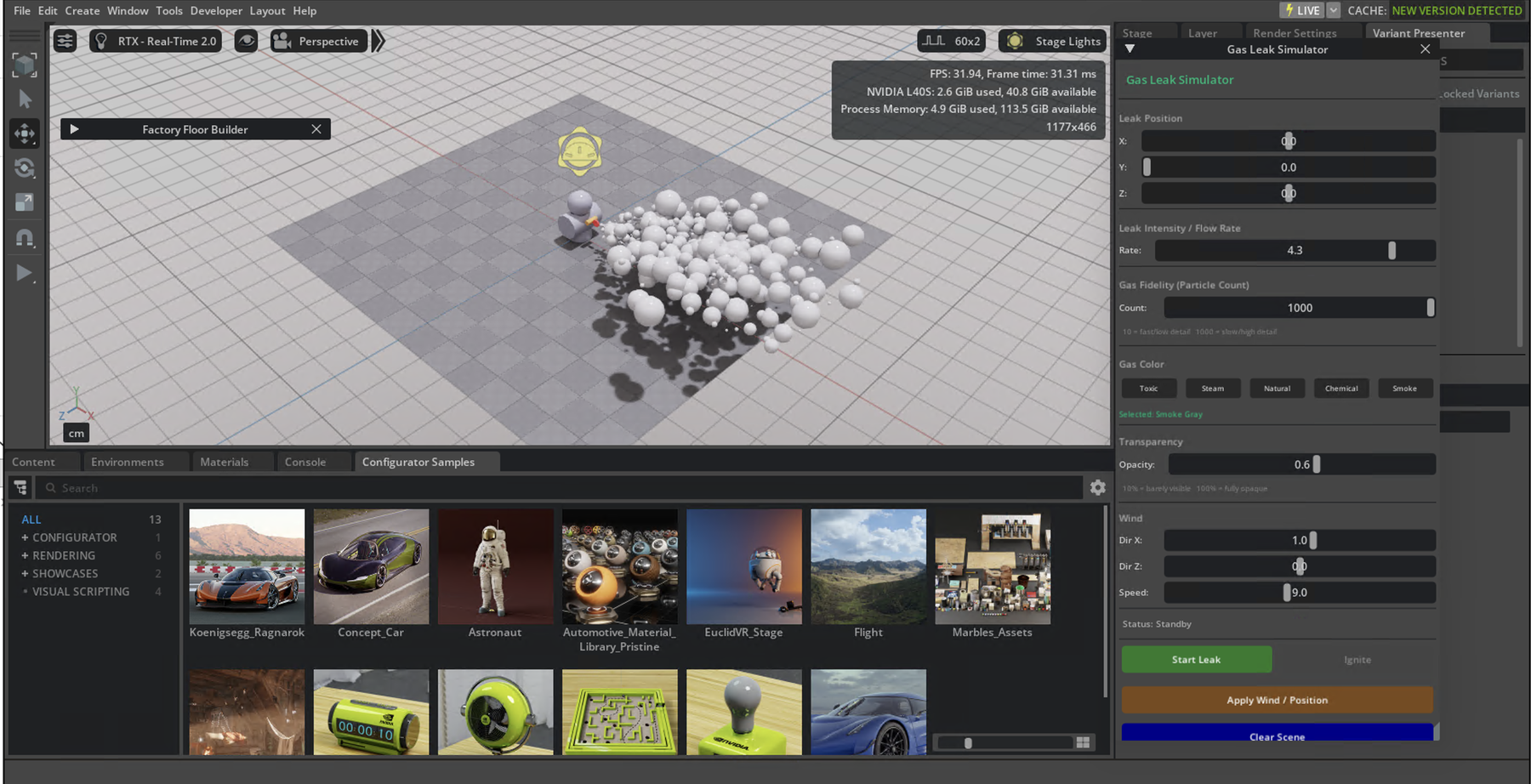 Kit extension inside Composer
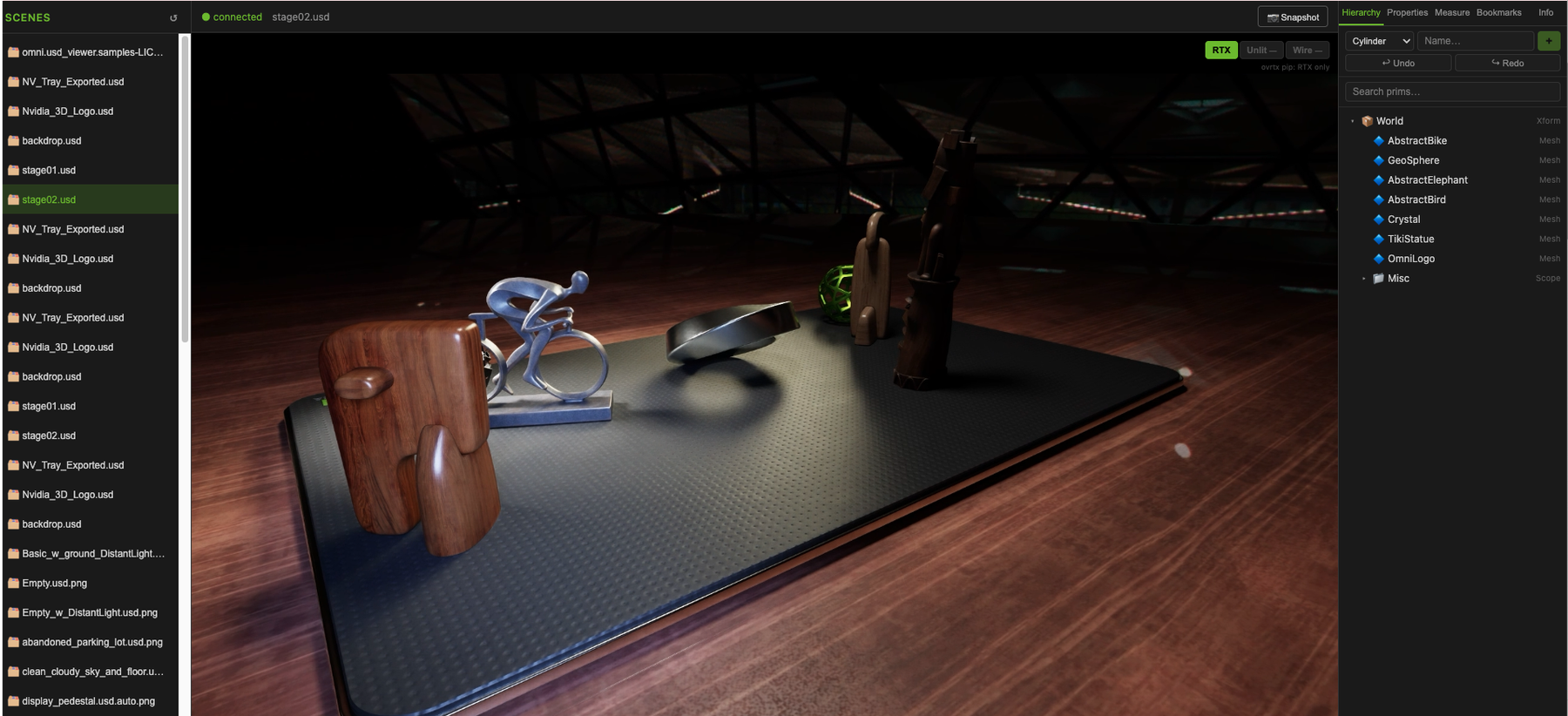 Library-first renderer behind a browser