From Camera Media to Gaussian Splats: Building ReconStudio
Pradeep Kaushik·Aug 15, 2026·Build Note·9 min read·Updated Aug 21, 2026
In this article 7 sections
I ended Part 1 with a practical question: could someone submit images or video and receive a Gaussian splat, an OpenUSD file and a useful report without operating the GPU pipeline themselves?
I built ReconStudio around a job record that keeps the run settings, stage evidence and outputs together. That became useful before the final scene even loaded. A weak camera solve was visible in the registration numbers; a finished report could be inspected while the large splat was still opening in the browser.
The reconstruction methods already existed. COLMAP could recover camera poses, and 3DGRUT, an open-source library from NVIDIA’s Spatial Intelligence Lab, could train the Gaussians and export them. I wanted to submit a job, see which stage it had reached, and get the files and measurements back without operating each tool separately.
Camera media is useful here because it is a common input. A team may not have current CAD, may not be able to exchange a supplier’s native format, or may only need the visual surroundings around the asset it is modeling precisely. A useful reconstruction still needs overlap, sharp frames and changes in viewpoint. In the environments I had in mind, access to a phone or camera was a smaller starting barrier than finding a current 3D model. Camera reconstruction offers a low-friction way to create the visual layer when that layer fits the use case.
Expose the failure before the final scene loads
ReconStudio accepts a video or a zip of photographs, creates a job, and carries it through eight stages:
Scroll sideways for more columns.
Stage
Work
Evidence exposed to the user
Ingest
Read the media and its basic properties
source type, image count, resolution
Frame selection
Keep sharp frames spread across the capture
frames considered, selected and rejected
Feature extraction
Find distinctive points in each image
median and minimum feature counts
Feature matching
Link the same points across views
matcher and completed work blocks
Sparse reconstruction
Solve camera poses and sparse 3D points
registration rate, model count, points and reprojection error
Gaussian training
Optimize the splat representation on a GPU
quality metrics, Gaussian count and GPU use
Export
Write the result into two useful forms
PLY and OpenUSD sizes, prim structure
Ready
Package the result and its evidence
downloads, report, viewer and replay
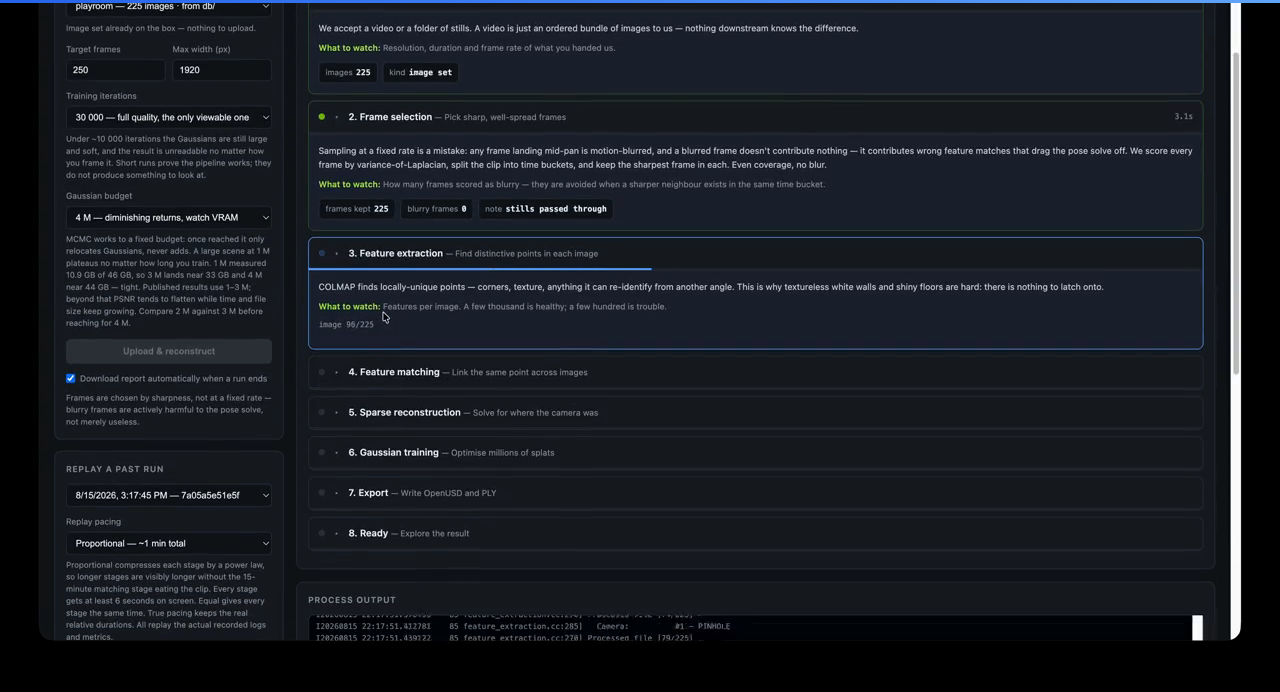
The dashboard is a view over that job record. It does not reduce a forty-minute reconstruction to a spinning progress bar. Each stage explains what it is doing and puts its current measure beside it.
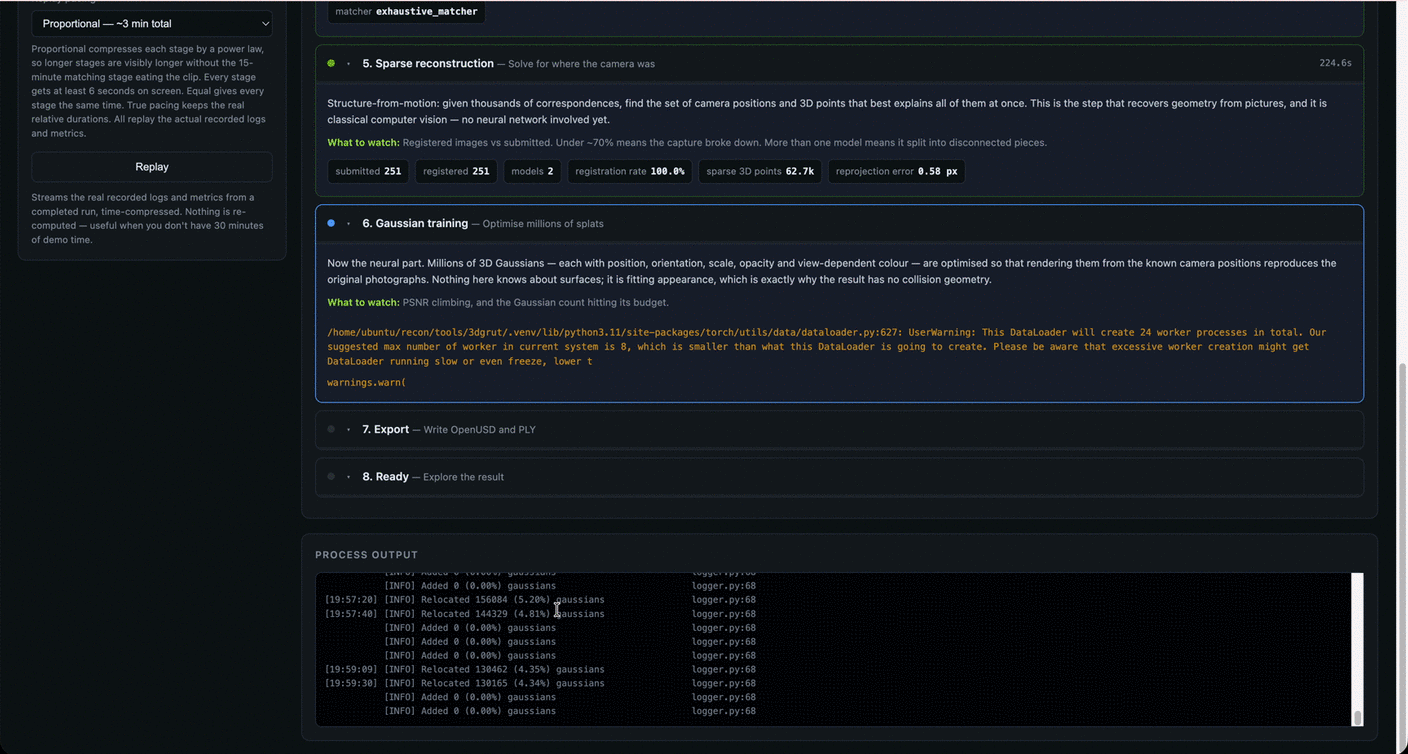
Early in the same run, frame selection has finished and feature extraction is moving through the images. I can still see what the previous stage kept, the settings used for the job and the process output below the stage.A recorded run in progress. The camera solve is complete and Gaussian training is running. Registration, sparse points and reprojection error remain visible beside the training log.
If registration has split the capture into several disconnected models, or only half the images have registered, waiting for more training will not repair the camera solve in this pipeline. The current POC does not expose cancellation. It does make the failure visible early enough for a hosted implementation to act on it.
Keep comparisons tied to the same scene
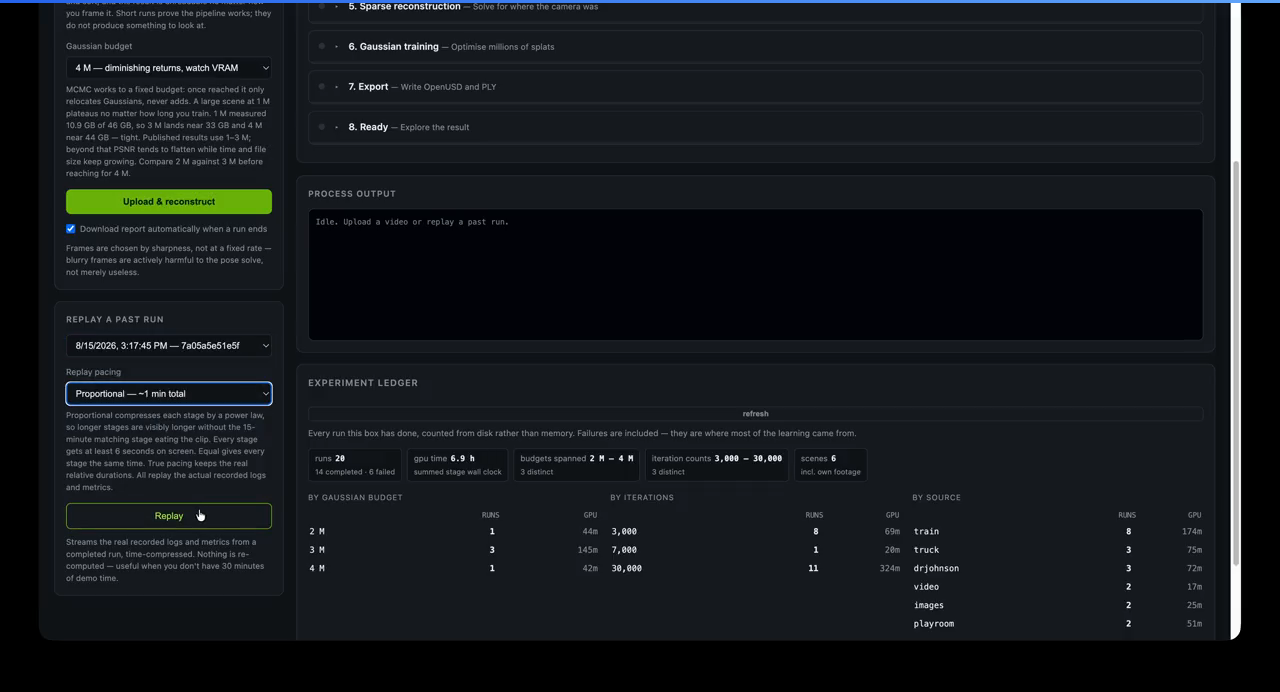
The experiment ledger came from a mistake I nearly made while running the pipeline. I compared scores from two different scenes and almost treated the difference as evidence about Gaussian budget. It was measuring the scenes. The ledger now groups budget sweeps within one scene, records where each metric came from and excludes untrusted values from ranking. Failed runs remain in the count because they were part of the work.
Replay is not a separate demo path. It reads a completed job's recorded events, while the ledger keeps the wider run history on the same screen for comparison.
Simulation mode serves a different purpose. It runs real ingest and frame selection, then exercises the API, dashboard, events and report path without fabricating a PLY or USDZ. That makes the user experience and job lifecycle testable on a laptop while keeping simulated execution distinct from a reconstruction.
The API is a job contract
A reconstruction is a poor fit for one long HTTP request. Real runs in this project took tens of minutes, used a GPU for the expensive stage, and produced files that could approach a gigabyte. The API therefore separates upload, execution, observation and download:
POST /api/jobs create a job from video or photographsPOST /api/jobs/{id}/start place it on the local workerGET /api/jobs/{id} read current state and metricsGET /api/jobs/{id}/events stream live eventsGET /api/jobs/{id}/replay replay the recorded event streamGET /api/jobs/{id}/artifacts/{name} download PLY, USDZ, report or snapshot
Creating and starting are separate on purpose. Finishing an upload should not mean seizing a GPU. A hosted version can validate the request, apply a quota, wait in a queue and start when a matching worker is available without changing the client contract.
Every event is also written to events.jsonl. Replay sends those recorded events back with compressed timing. It is the same log, stage transition and metric that the real run produced, which lets a completed forty-minute job be demonstrated in a few minutes without pretending that a simulation is the original computation.
A 58-second replay of a recorded playroom job. The timing is compressed, but the stage transitions, logs and metrics come from the original run.
The final job record is equally plain. job.json holds the state and metrics, while the artifact directory holds the files. The dashboard, report generator and API all read that same record.
This local state is deliberately limited. Completed jobs remain readable and replayable after a process restart, but the active-job registry lives in memory. A created job that has not started cannot be started after that restart. A hosted version needs a transactional job record or durable queue for that transition. The client can keep the same job model when local disk moves to a database and object storage.
One job, several useful outputs
I did not want the service to end with a single opaque download. The same reconstruction is packaged for different consumers:
Scroll sideways for more columns.
Output
Why it exists
scene.ply
Direct Gaussian data for browser and dedicated splat viewers
A small, self-contained record of settings, timings, metrics, source-frame samples, USD structure and process output
events.jsonl
The recorded event history used to inspect and replay a run
job.json
A machine-readable summary for another service or client
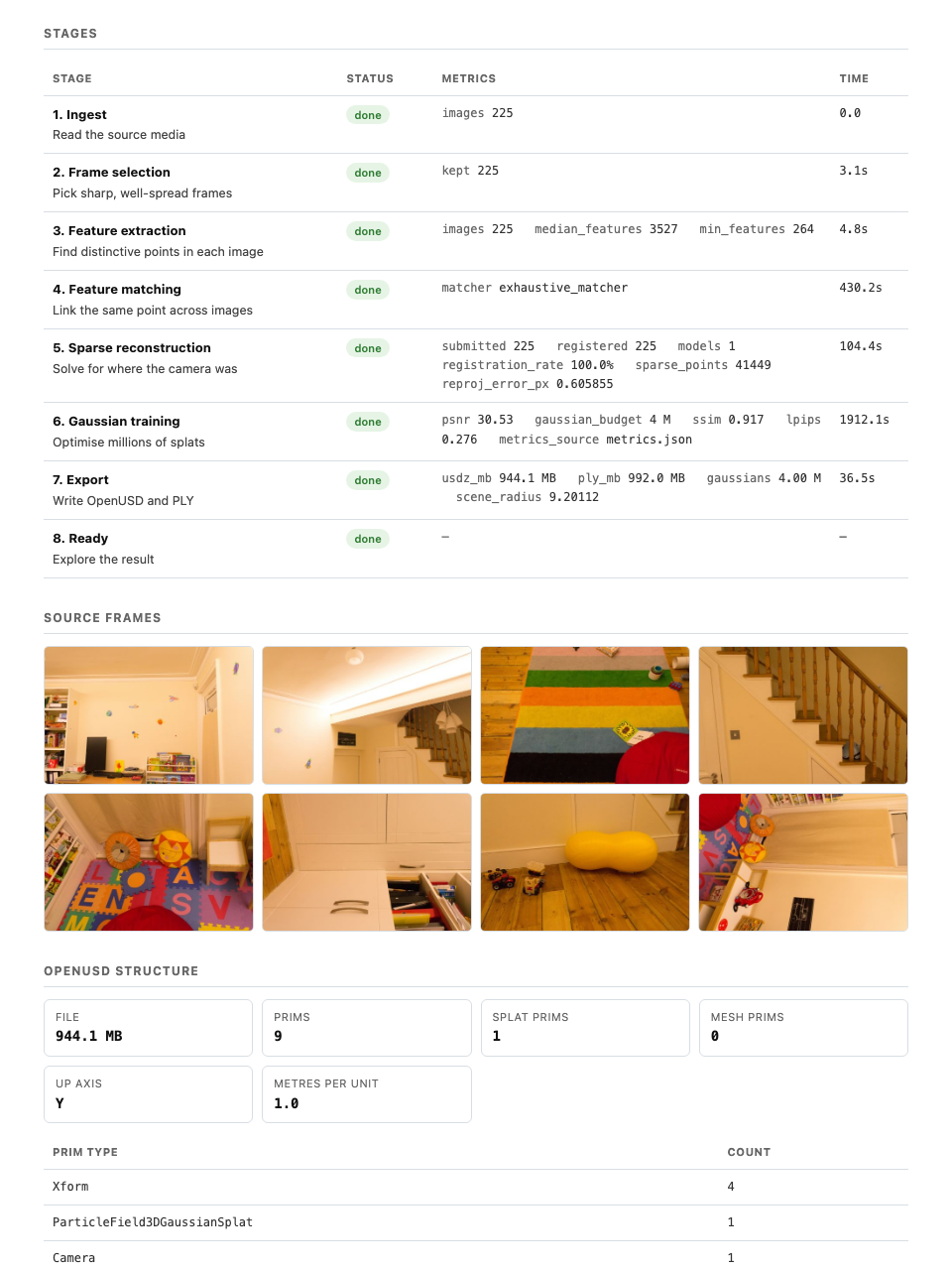
The report became more important than I expected. A three- or four-million-Gaussian PLY takes time to parse and render in a browser. During that wait, a black viewport can mean loading, framing trouble or a broken file. The report opens immediately after the job completes and answers the first questions without needing to render the scene: did the images register, how long did each stage take, what did the USD contain, and how large are the exports?
The self-contained report makes the finished job inspectable before the large PLY or USDZ has loaded. This measured playroom run registered all 225 images and records the stage evidence beside the exported OpenUSD structure. Source images: Deep Blending.
The PLY and USD also have different jobs. The PLY is the easiest way to inspect the appearance in a tool such as SuperSplat. The USD package carries the scene structure and the standard Gaussian particle-field prim. It still has no mesh surfaces, collision geometry, semantics or known physical scale. Those belong in other layers when the use case requires them, as described in the fidelity article.
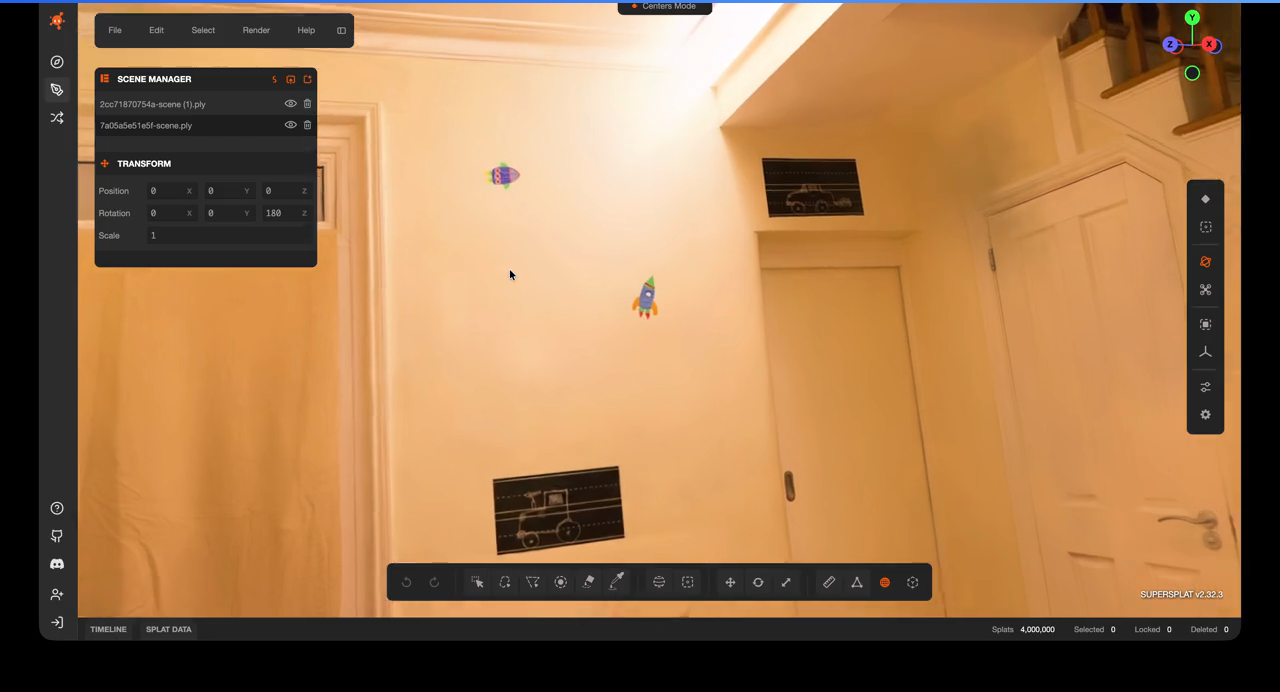
The PLY handoff opens the result in SuperSplat for spatial inspection. Orbiting outside the original camera path is also where weak coverage and stray Gaussians become much harder to miss.
The architecture I tested
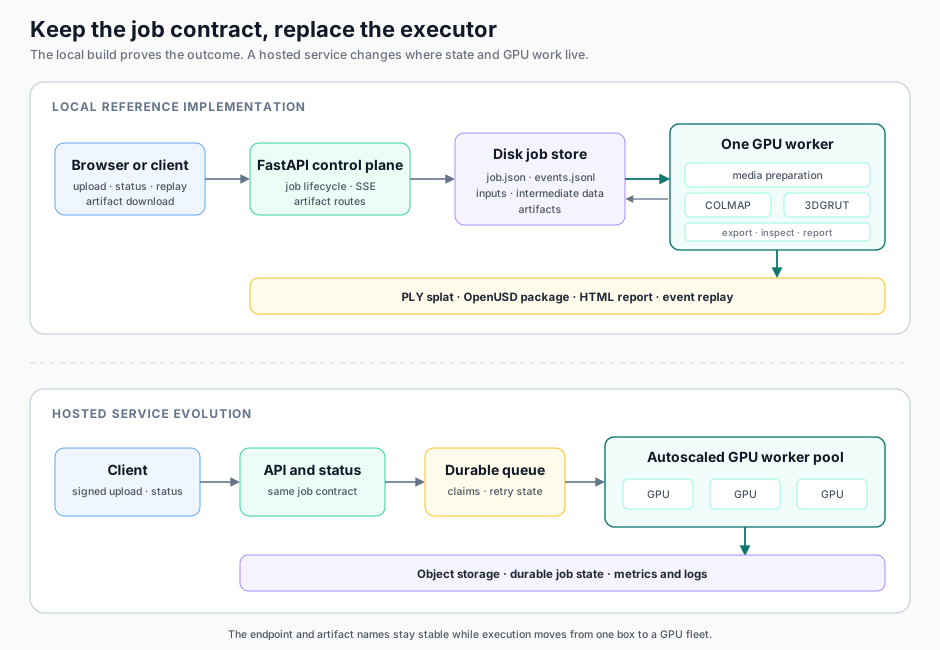
The reference implementation runs on one GPU machine. FastAPI owns the control plane, a background worker owns the GPU, and each job gets a directory containing its inputs, intermediate data, events and outputs. The worker calls ordinary tools behind adapters: OpenCV and FFmpeg for media, COLMAP for camera poses, 3DGRUT for training and export, and OpenUSD for inspection.
The local implementation tests the job contract on one machine. A hosted service can keep that contract while replacing the local executor with durable storage, a queue and an on-demand GPU pool.
One machine was enough to test the camera-to-output contract. I left authentication, tenant isolation and fleet management out of the reference implementation; the next part of the diagram is a proposed hosting design.
The hosted shape follows directly from the boundaries already in the app:
The client uploads media, ideally through a signed object-storage URL.
The API validates the request and writes a durable job record.
A queue holds the job until a worker with the required GPU profile claims it.
The worker downloads the inputs, runs the same adapters, uploads the artifacts and emits status events.
The worker can terminate when the job is complete. The API and artifacts remain available without keeping the GPU alive.
This is where GPU-on-demand belongs in the design. The API should express the outcome and job state. Provisioning is an executor concern behind the queue. A service builder can scale workers from queue depth and wait time, then route work using requested budget, image properties and measured memory headroom. The pool can scale to zero when no reconstruction is waiting. My later runs showed that Gaussian budget alone was not enough to predict peak GPU memory.
The repository stops at the upper half of the diagram. Quotas, durable retries, cancellation, signed downloads, service observability, cost controls and retention still need implementation before the hosted design is usable.
A measured run through the contract
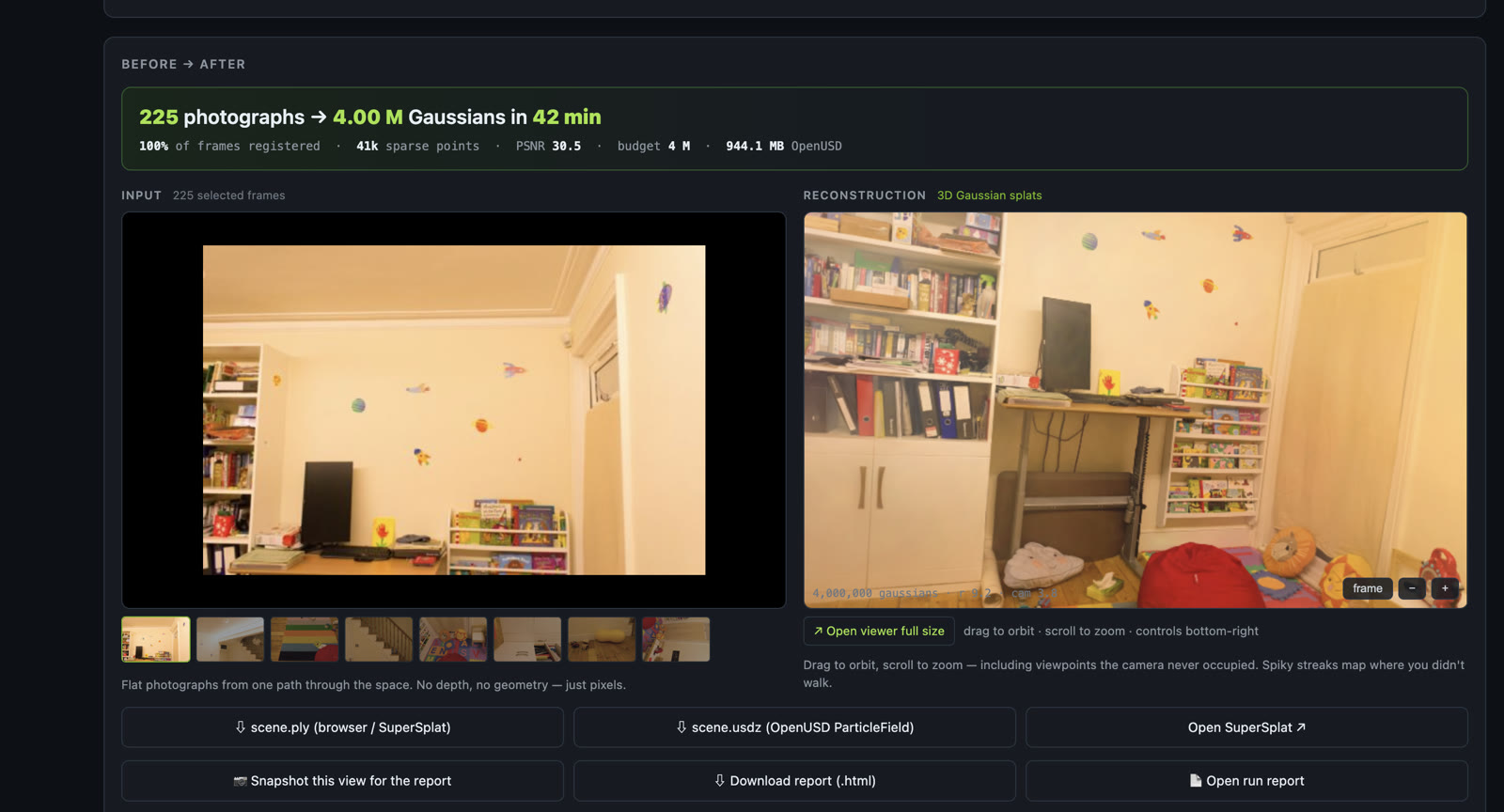
The public repository includes one compact sample from a real playroom run. The source photographs come from the Deep Blending scene distributed with the official 3D Gaussian Splatting evaluation data. The run used 225 photographs, registered all 225, trained to a four-million-Gaussian budget and completed in 41.5 minutes on one NVIDIA L40S. The OpenUSD package was 944.1 MB.
The sample run included with the repository. The left side is one selected input photograph. The right side is a rendered viewpoint in the reconstructed room.
I chose this sample for the repository because it exercises the full path and is small enough to inspect as a report, a short recording and a few images. The 944 MB export is also a useful systems result. Large artifacts make object storage, resumable download and retention policy part of the service design long before the API sees heavy request traffic.
The number is not a recommendation to use four million Gaussians. The later one-million and four-million outputs showed no paired-frame PSNR separation, while the larger job took longer and produced four times the output. The complete comparison and its limitations belong in Part 3.
What the build established
Once an operator installs the toolchain, a user can submit media, follow the stage evidence and receive the artifacts without operating COLMAP or the trainer for each run. When a reconstruction is poor, the job record gives them somewhere to start diagnosing it. It cannot recover views the camera never captured or remove motion blur from the input.
You can use the reference to reproduce that pipeline or replace an adapter. It binds to localhost, applies upload and expanded-archive limits, and remains single-node, single-worker and unauthenticated. The measured run demonstrates that local contract; it does not validate the proposed hosted service.
The code, setup instructions, architecture notes, sample report, images and the 58-second recorded replay are in github.com/pr9868/reconstudio. In Part 3, I cover the experiments behind it: 24 job records across six scenes, the measurements I initially got wrong, and what the comparisons said about capture, Gaussian budget, GPU memory and the limits of the output.
The next project starts from that exported splat. SplatStage asks what it takes to clean, scale, compose and package it as a visual-ready twin foundation.
Disclaimer: The views and opinions expressed in this account are those of my own and do not represent those of my employer, NVIDIA.