Building SplatStage: From Edited Gaussians to OpenUSD
Pradeep Kaushik·Aug 21, 2026·Build Note·15 min read·Updated Sep 19, 2026
In this article 10 sections
My Gaussian editor could remove a million splats, show the cleaned result and save a new PLY. The OpenUSD export still contained the original scene.
The exporter still read the trainer’s checkpoint. My edits happened later, against the exported PLY, so none of them could reach the OpenUSD file. Each component worked on its own while the edited scene never made it through.
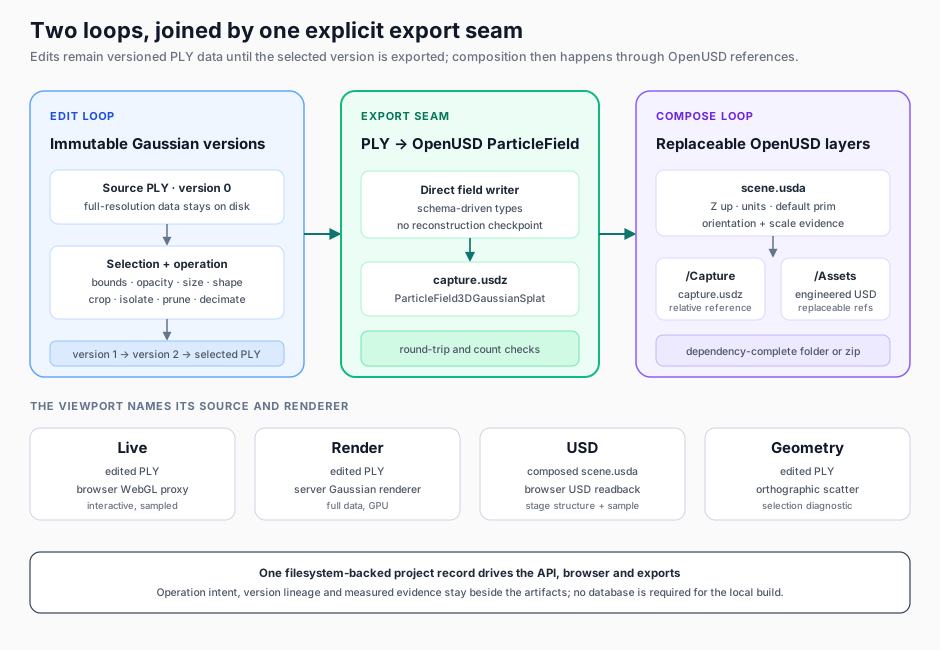
That seam became the center of SplatStage, the application I built after ReconStudio. ReconStudio produces a Gaussian reconstruction and OpenUSD asset from camera media. SplatStage starts with the PLY and lets a user inspect and edit it without destroying earlier versions. It exports the selected version directly into an OpenUSD Gaussian particle field, then composes that capture with replaceable engineered USD assets.
Part 1 explains why I call the result a visual-ready twin foundation rather than a finished digital twin. This article covers how I built it. Part 3 puts the whole workflow under load with a 5.8-million-Gaussian Garden scene.
The selected PLY is the contract between editing and export. The wrapper stage then composes the exported capture with replaceable OpenUSD assets.
Why this became a separate application
At first I considered extending ReconStudio. The two tools touch the same data, but their work has a different shape.
Scroll sideways for more columns.
Reconstruction
Editing and composition
mostly sequential
deliberately nonlinear
camera media is the source
a completed PLY is the source
expensive stages run for tens of minutes
many operations complete in seconds or a few minutes
success produces an asset
success produces versions, decisions and a stage
a job usually has one terminal output set
a user may branch, undo, compare and return later
ReconStudio is a job pipeline, while SplatStage is a stateful workbench; combining them would have made the reconstruction job responsible for a long-lived editing history and made each editor experiment look like another pipeline run.
I kept the handoff ordinary: a PLY file and its evidence. That also makes SplatStage useful for Gaussian splats created by another reconstruction tool.
The export seam had to become explicit
The first exporter path called NVIDIA’s 3DGRUT. It transformed a reconstruction checkpoint into the OpenUSD representation produced at the end of training. That was appropriate inside ReconStudio and unusable after PLY editing.
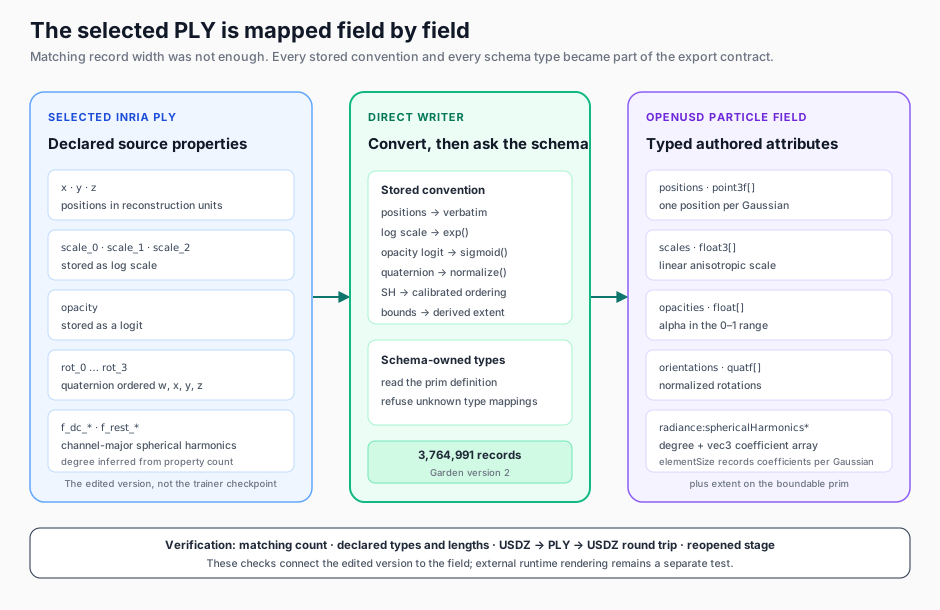
I briefly tried to rebuild the checkpoint state from a PLY. The file sizes made the danger look smaller than it was: the PLY record and exported field both consumed roughly the expected number of bytes per Gaussian. Matching width did not prove matching field order, data type, quaternion convention or spherical-harmonic layout.
The decisive evidence came from the OpenUSD schema. ParticleField3DGaussianSplat describes the fields and their types. The edited PLY already carried the positions, scales, rotations, opacity and spherical-harmonic coefficients I needed. The reliable path was a direct writer whose contract was:
selected PLY
  → parse declared PLY properties
  → map each property to the schema field and type
  → author ParticleField3DGaussianSplat
  → reopen the package and verify count, fields and stage structure
The adapter owns the representation-specific conventions. The schema owns the authored types, and the checks reconnect the resulting ParticleField to the selected edit version.
I also added a round-trip check: export PLY to USDZ, read the particle field back to PLY, and export it again. A round trip cannot prove that the scene is visually correct, but it can expose count changes, missing arrays and incompatible field layouts before a user reaches the final stage.
I could test the editor and exporter separately and still produce the wrong scene. The assertion I needed was end to end: the named PLY version selected in the application goes in, and the same record count must come out of the particle field.
One project record, two loops and an export seam
The local application uses a FastAPI service and a browser interface. I kept persistence on the filesystem instead of adding a database, so the project record, immutable PLY versions, operation lineage, exports, parts and package manifests all live beside one another on disk.
I used that file layout to separate editing from composition.
The API separates selecting Gaussians from changing them:
selection: outside robust boundsoperation: isolate the coreselection: inside a user-placed cylinderoperation: crop the selectionselection: low opacity AND large scaleoperation: prune selected Gaussians
A selection answers which Gaussians. An operation answers what to do with them. Boolean predicates let a geometric region combine with opacity, percentile, size or shape tests without creating a bespoke endpoint for every editing recipe.
Preview returns the selected count before the operation writes a child PLY. Undo selects an earlier version; it does not try to reverse the calculation. Each edit writes a complete file; the storage cost appears in the host record below.
For large files, the service memory-maps the PLY fields and processes them in chunks. The browser receives a sampled proxy for interactive navigation, while export and server rendering continue to use the full selected version. In the Garden project, the proxy contained 4.43 million of the original 5.83 million Gaussians. It was still large, but it avoided pretending that a sampled viewport was the full asset.
Orientation and scale are evidence, not toggles
After cleanup, I designed the next step to establish a stage frame rather than merely set two metadata fields.
In the Garden run, I selected points on a surface that should be horizontal. SplatStage fitted a plane, let me flip its normal and calculated the transform that rotates it toward the stage up axis. The recorded final normal was approximately [0.038, -0.612, -0.790] after I flipped the initial fit.
For scale, I built a two-point measurement that records the scene distance, entered real distance and derived scale factor. I left that step for a later run while I finished the structural path, so the stage declared a unit convention while the project marked metric calibration as unverified.
This is intentionally stricter than a scene-setting control. upAxis = "Z" and metersPerUnit = 1 are OpenUSD metadata. They describe how downstream tools should interpret the stage. The operation record explains why the capture transform deserves to be interpreted that way.
Composition stays layered
SplatStage writes a wrapper scene.usda rather than flattening the capture and every added asset into one opaque file. The structure keeps three responsibilities separate:
/World/Capture reference to the exported Gaussian USDZ/World/Assets references to added USD assets/World/Physics reserved scope for authored physical layers
I kept this build’s import boundary at existing OpenUSD assets. They may be CAD-derived, but SplatStage is not a native STEP or CAD importer. In the Garden demonstration I used two person stand-ins and a beacon, all already expressed as USD. The value being tested was placement and composition, not CAD translation.
Each reference remains independently replaceable. I could adjust a part transform or swap its source without rewriting the 888.5 MB Gaussian capture. The wrapper stage is small enough to inspect directly, and the package builder collects the referenced files with relative paths.
I chose an inspectable folder and zip as the delivery shape for this working project. That keeps the wrapper, capture and parts visible and replaceable. OpenUSD’s USDZ specification supports packaged assets, including packages that contain other packages; the folder/zip choice here is a project decision about inspectability, not a format prohibition.
The packager reopens its copied stage after rewriting the references and reports anything missing. That proves the delivered dependency graph is self-contained on the authoring host. I have not yet opened it in a second OpenUSD runtime, so cross-runtime support remains a separate claim.
A viewport needs to say what it is showing
SplatStage has four viewport modes because “the scene” can refer to different data and different renderers:
Scroll sideways for more columns.
Mode
Source
Renderer
What I check there
Live
selected PLY, sampled
browser WebGL
interaction and the proposed selection
Render
selected PLY, full
server Gaussian renderer
appearance using the full working splat
USD
composed scene.usda, sampled after readback
browser WebGL
whether the exported capture and references load
Geometry
selected PLY
orthographic point/shape diagnostic
selection boundaries and scene extent
That label is part of the evidence. Without it, a final-looking image could still be a preview of pre-export data. The USD mode opens the wrapper stage, follows the capture reference, reads the particle field and then builds its browser sample. It is not an external renderer, but it catches a class of broken-reference and stale-export failures the live view cannot.
The current end-to-end experience
The recording below condenses the four-part Garden run into 82 seconds. It follows the actual interface from inspection through statistical cleanup, intentional object removal, OpenUSD export, orientation, asset placement and final USD readback.
An 82-second cut from four source recordings. The viewport moves from the working PLY to the composed OpenUSD readback; the editing and export operations are the real Garden project.
Long operations return an accepted response with an operation ID. The server keeps their in-flight status in memory, and the browser polls it. A page refresh can reconnect while the server process remains alive. When an operation finishes, its durable result lands in the version lineage or export files on disk. A server restart would lose the transient progress record, though completed artifacts would remain. That is adequate for this single-user workbench and is not a substitute for a durable job queue.
Each visible step can also write a self-contained HTML evidence snapshot. It embeds the current render rather than linking to it, presents the important state as a readable table, retains the cumulative activity log, and stores the same state as JSON in a snapshot-state script block. The file fetches nothing, can be opened after the application has stopped, and can be printed to PDF.
A screenshot answers what did the viewport look like? The snapshot also answers which asset and version was open, what produced the view, how much data was drawn, and what stage state existed at that moment?
Packaging gets its own record. The manifest lists the root stage, dependencies, file sizes and missing references. Portability is checked by reopening the moved stage and resolving the files it names.
Keep the edit history beside the scene
I kept the selected version and operation record visible through the seven workflow steps. Before applying an edit, I wanted to see which data it would change. After export, I wanted to know whether the view came from that exported stage.
These captures come from an earlier Garden pass through the application. Part 3 reports the final measured run; the intermediate counts here belong to the pass shown.
1. Asset: know what is entering the project
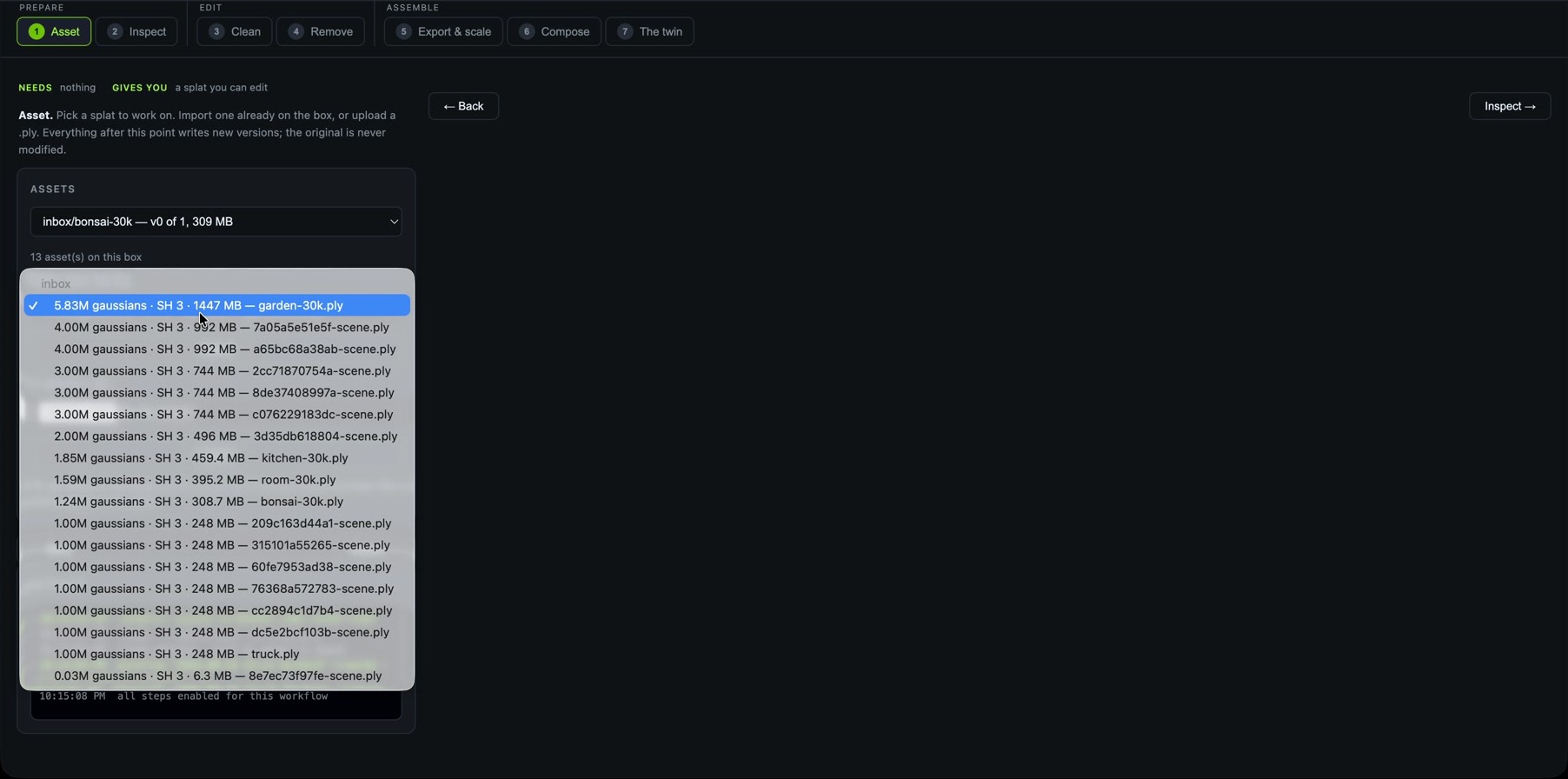
Several copies of a reconstruction can look alike in a file picker. Before import, I can check that this Garden PLY has 5.83 million Gaussians, spherical-harmonic degree 3 and a size of 1,447 MB. Import copies it into version zero and records its property layout, leaving the source alone. Later edits refer to that named starting point.
Asset. The first decision is which source becomes the immutable starting version. Count, representation and file size are visible before import.
2. Inspect: put measurements beside the scene
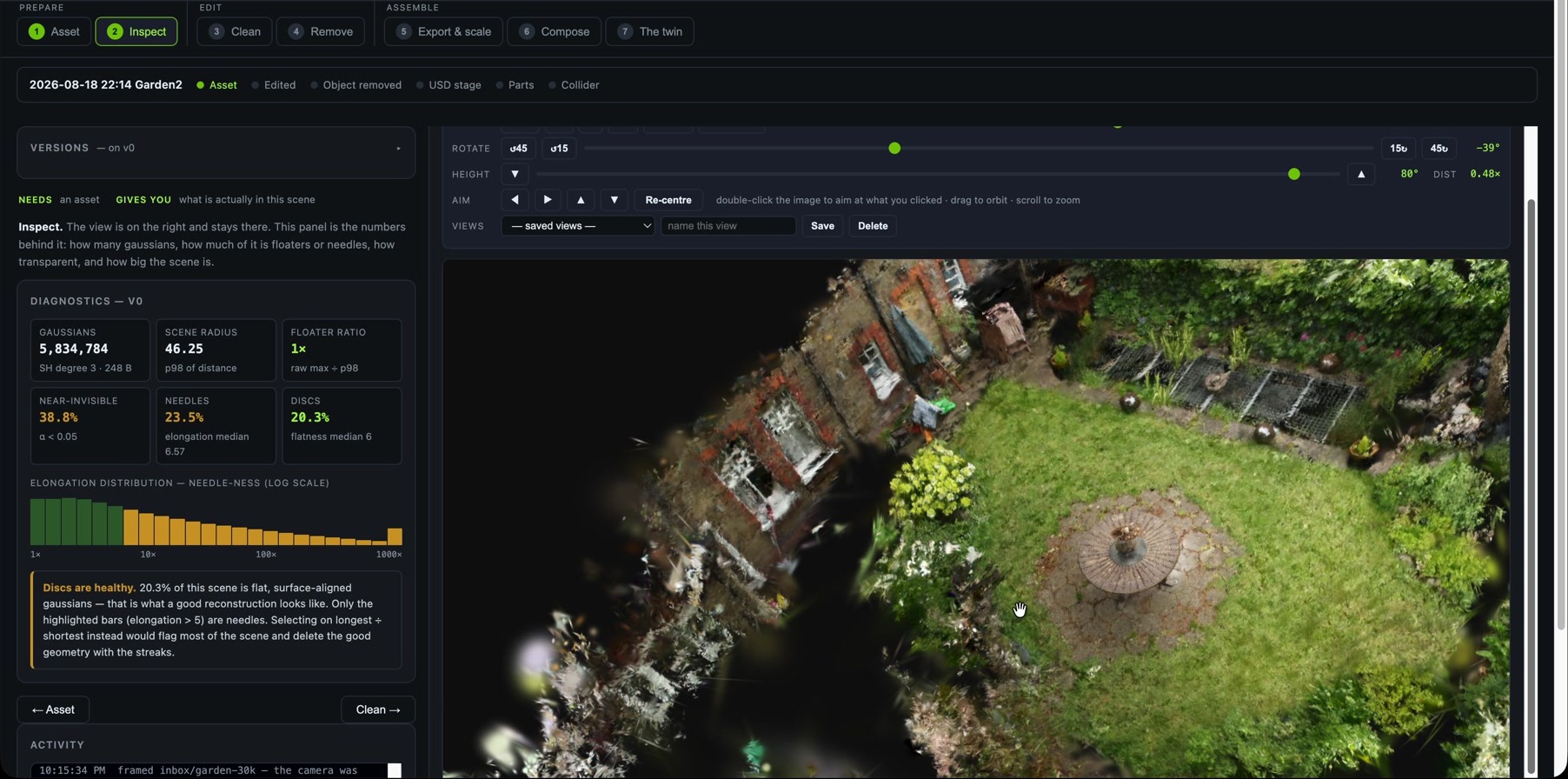
I put robust bounds, opacity statistics and shape distributions beside the scene so I could check what a proposed filter would touch. The many disc-like Gaussians are a good example: surface-aligned discs can be part of a healthy reconstruction. A high count alone does not justify deleting them. I use the elongated tail to choose what to inspect more closely.
Inspect. Version zero, the diagnostic summary, shape distribution and live scene stay in one view. The numbers describe the asset before an edit changes it.
3. Clean: make a statistical edit traceable
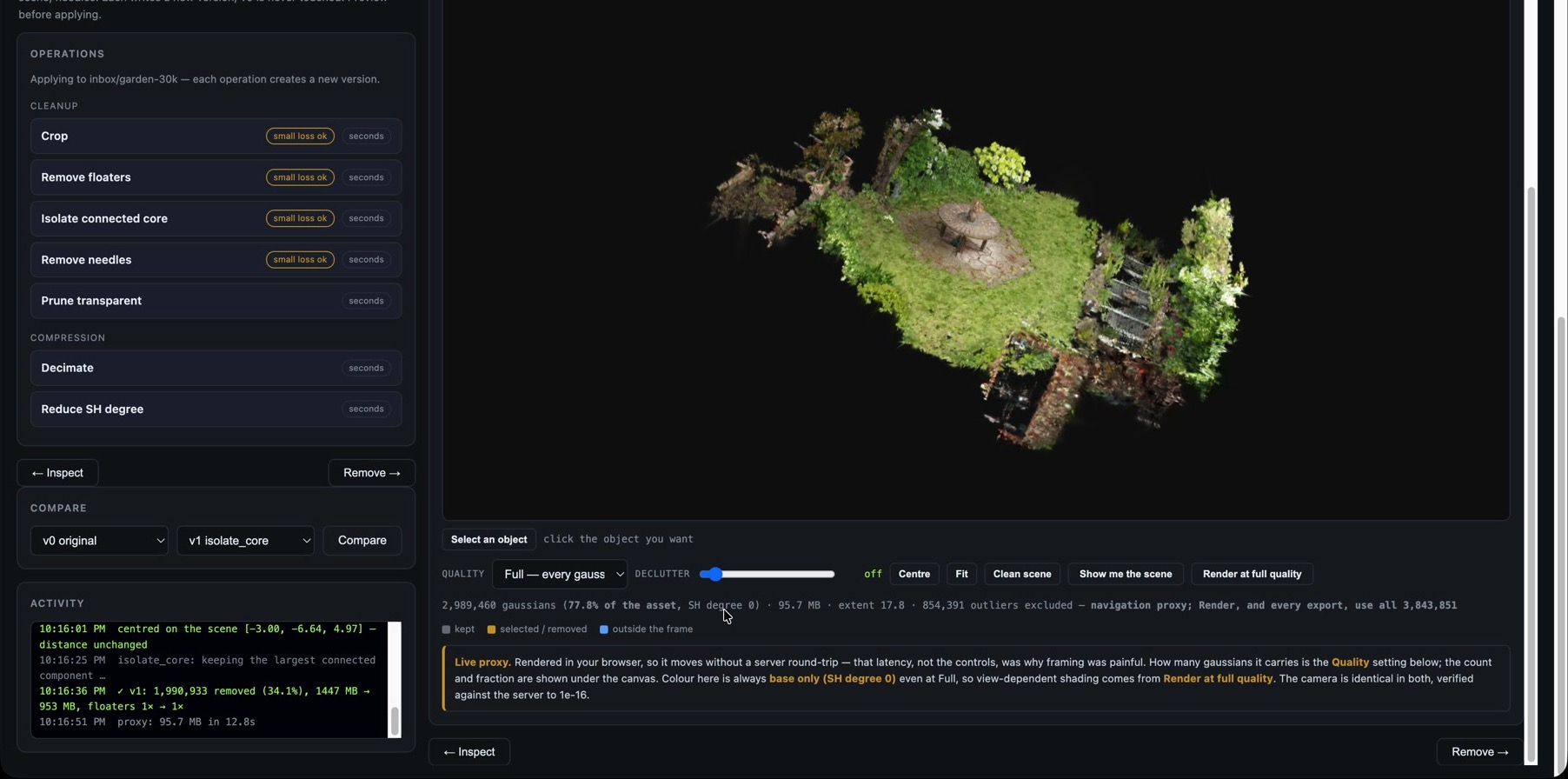
Clean previews how many Gaussians match a predicate before Apply writes a child version. In this pass, isolating the connected core removed 1,990,933 Gaussians, or 34.1 percent of the source, and reduced the PLY from 1,447 MB to 953 MB. The image shows whether the garden still looks coherent; the operation record preserves what changed.
Clean. The operation catalogue, output and activity record share the screen. The selected predicate and the resulting version remain inspectable after the operation completes.
4. Remove: separate deliberate editing from cleanup
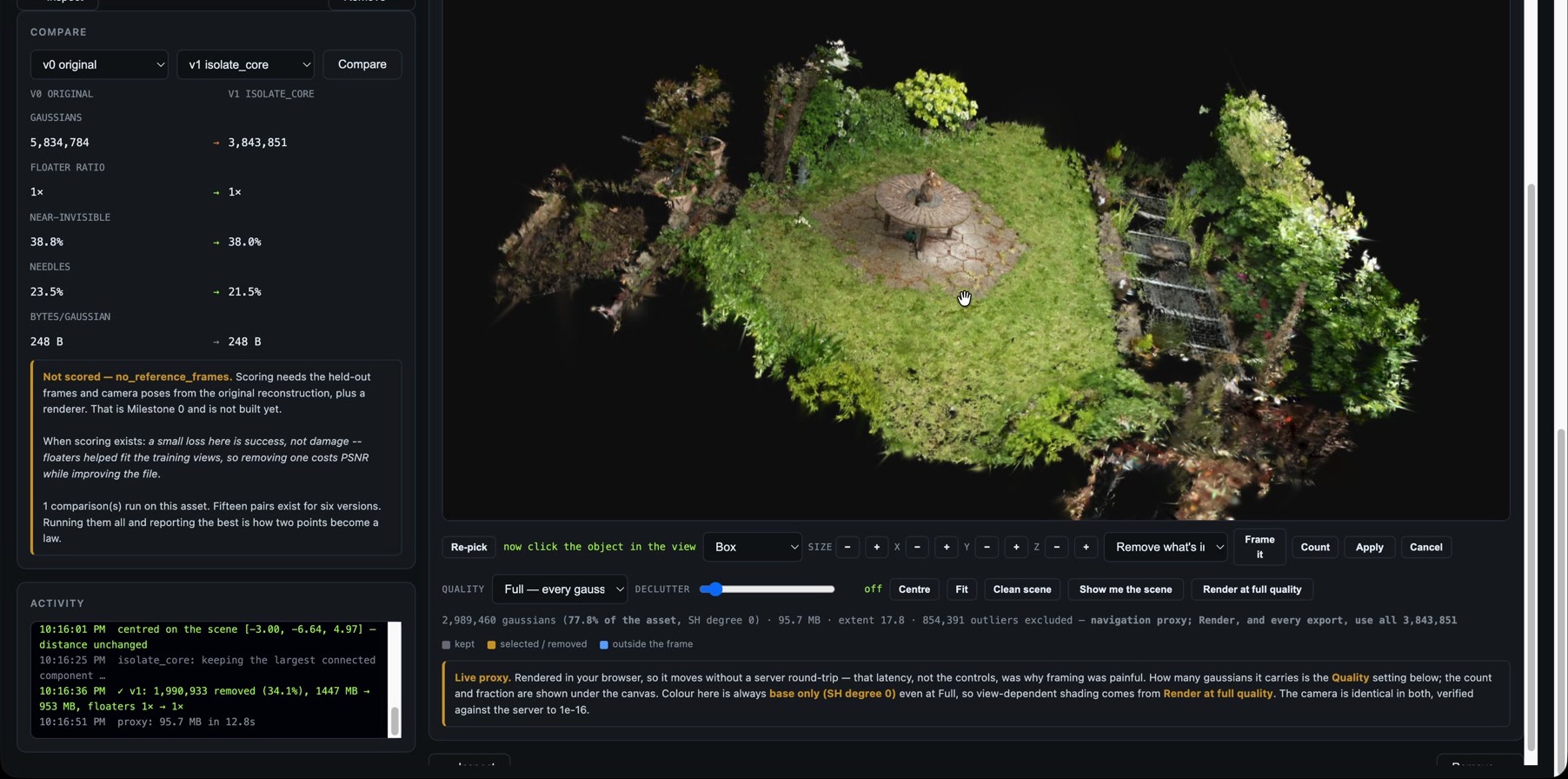
Statistical cleanup cannot decide that a table or person should leave the scene. I kept deliberate removal separate: place a region, combine it with data predicates and inspect the selected count and preview before committing. The user supplies the intent. Deletion also exposes whatever the cameras failed to reconstruct behind the object; it does not fill that surface back in.
Remove. Comparison, region controls and preview count make an intentional removal visible before Apply creates another immutable version.
5. Export and scale: keep uncertainty visible
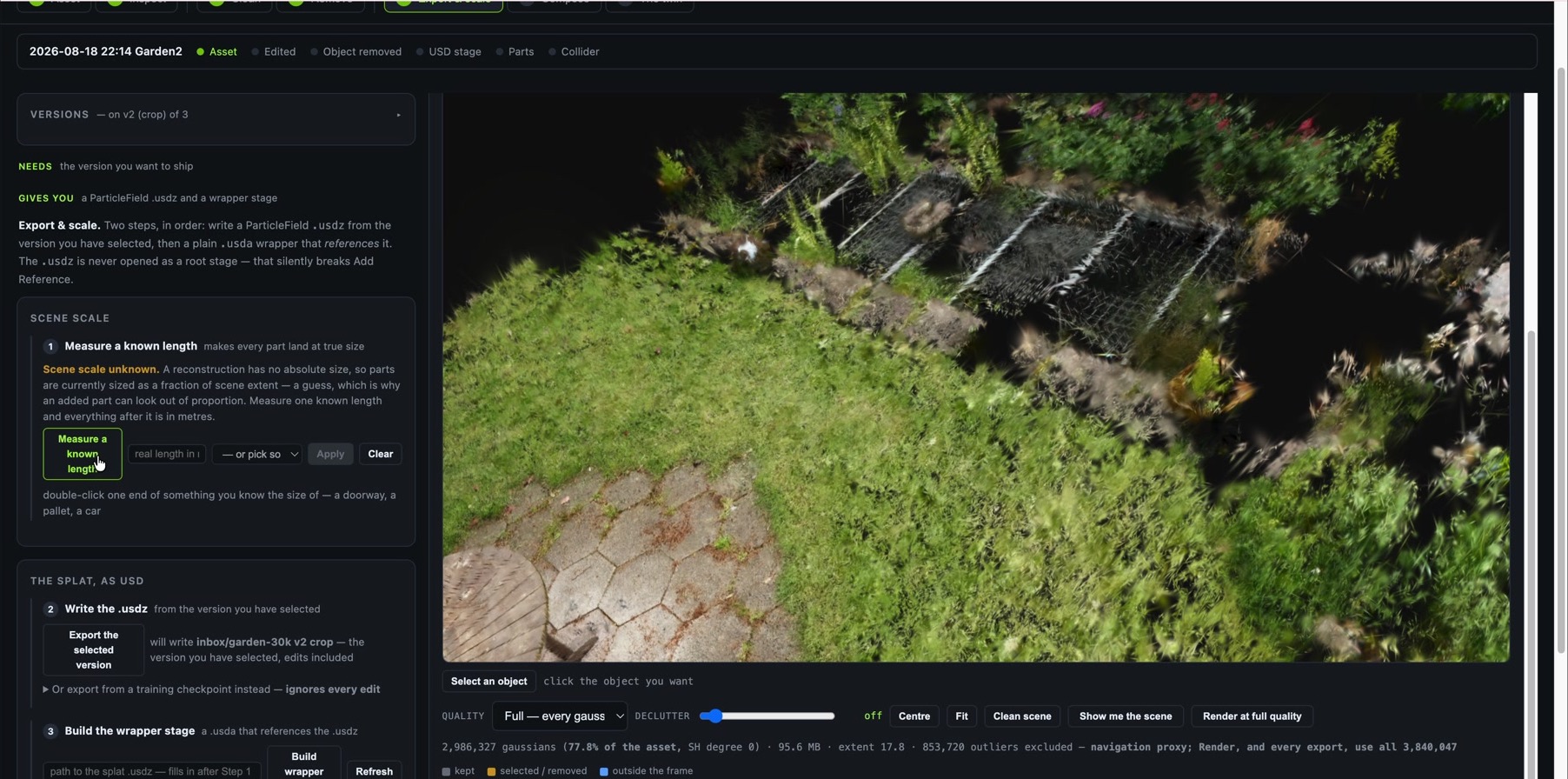
Export and scale keeps orientation separate from metric calibration. The warning is deliberate: scene scale is still unknown. The screen records a known-length measurement when one is available and makes the selected PLY version the input to direct ParticleField export and wrapper-stage creation.
Export & scale. Unverified scale remains visible while the selected edit version moves through direct OpenUSD export and into a reference-based wrapper stage.
6. Compose: keep engineered assets replaceable
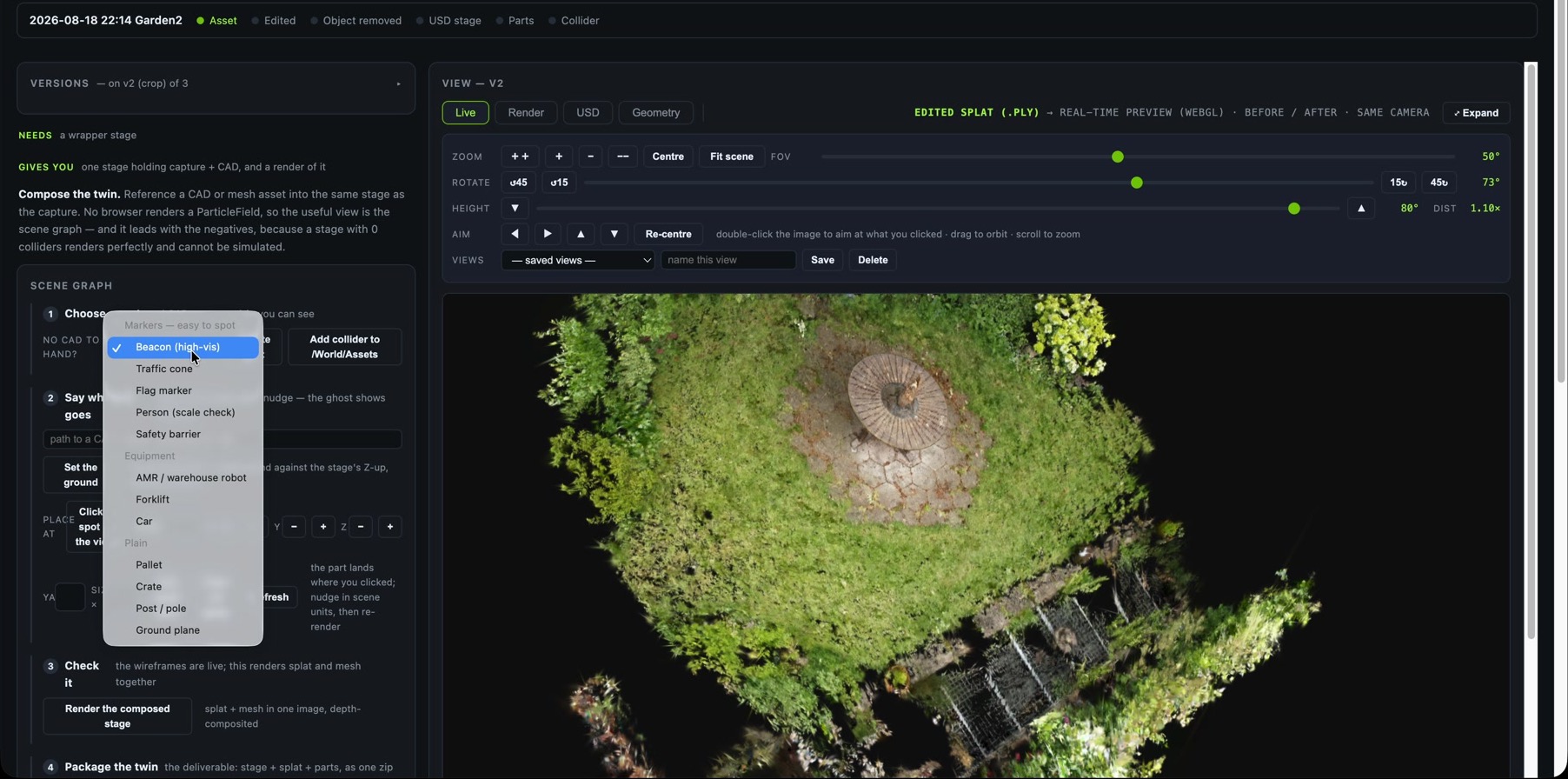
I kept added USD assets as separate references so I could move or replace them without rewriting the Gaussian field. The oversized people in this pass exposed the unresolved scale. Shrinking them until they looked right would have hidden the missing measurement. As the composition section explains, SplatStage does not translate native CAD; this menu starts with assets already converted for composition.
Compose. Existing USD and mesh assets are placed as separate references. The viewport identifies the edited PLY as its source while composition is still in progress.
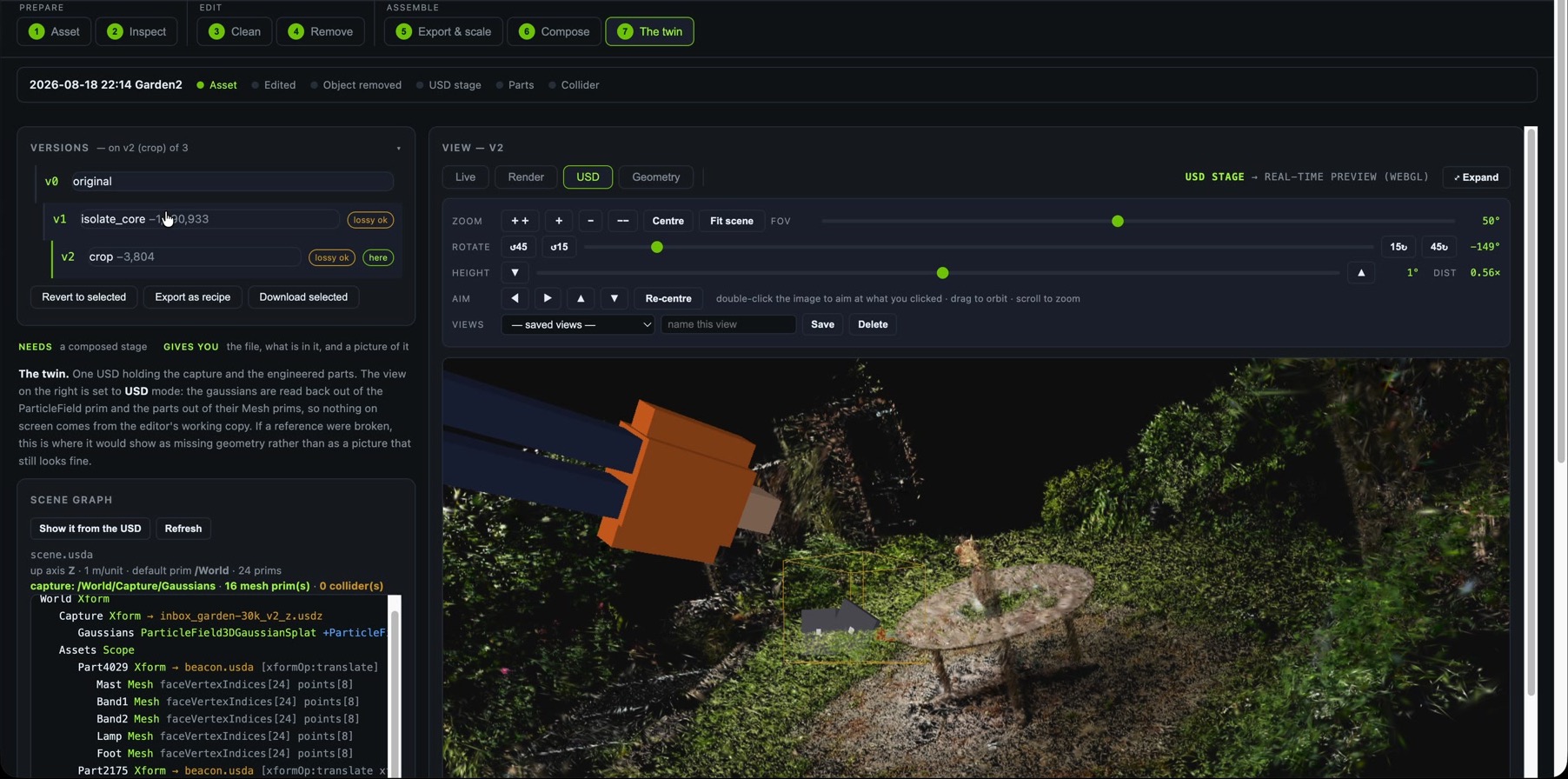
7. The twin: read the authored stage back
The final step opens the wrapper stage, follows the capture reference and reads the Gaussian particle field back for the viewport. That can expose a stale export or broken reference that Live mode would hide. The scene graph places the capture and added assets beside the version lineage; the view establishes structural readback, with scale, physics and operational connections still unresolved.
The twin. Version lineage, the OpenUSD scene graph and USD readback appear together. The screen makes the source of the final view explicit.
The test host was bigger than the app required
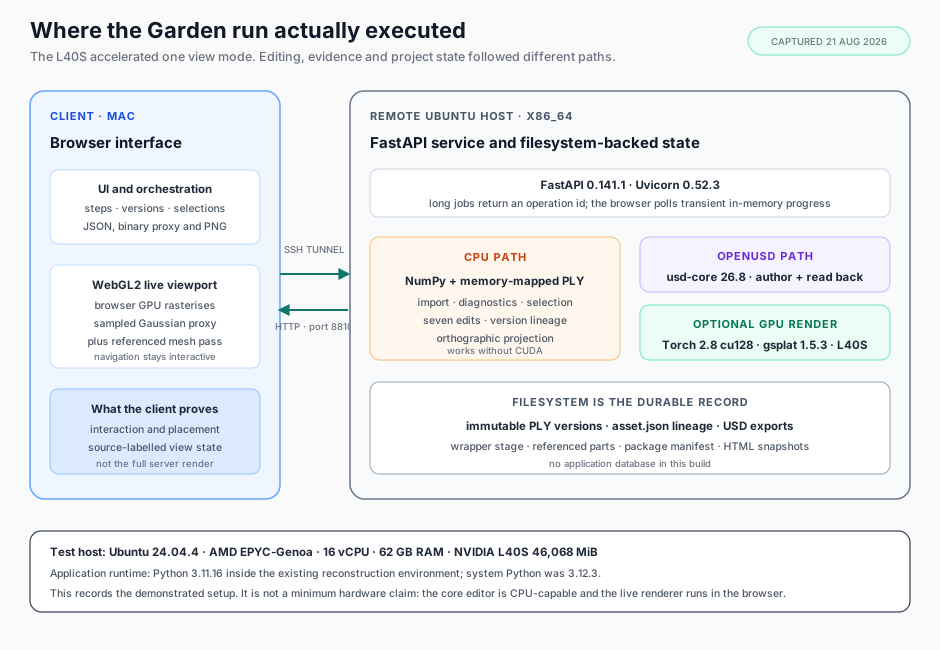
I ran the Garden walkthrough from a browser on my Mac, connected through an SSH tunnel to a temporary remote Linux host. I captured the host configuration on 21 August 2026 before releasing it. That record corrected an assumption I had nearly written into the project notes: the application used an L40S, but the L40S was not running the entire application.
The live viewport used the browser's GPU. Editing and diagnostics followed the CPU path; OpenUSD authoring used usd-core; only the full server render used Torch, gsplat and the L40S.
Scroll sideways for more columns.
Captured layer
Tested configuration
What used it
Host
Ubuntu 24.04.4 LTS, x86_64
remote service and files
CPU and memory
AMD EPYC-Genoa, 16 vCPU, 62 GB RAM
import, diagnostics, selection, edits and projection
Disk at capture
242 GB root, 136 GB free
complete PLY version copies, USD exports and packages
GPU
NVIDIA L40S, 46,068 MiB; driver 595.80
optional full-quality server Gaussian render
Application interpreter
Python 3.11.16
service process, using the existing 3DGRUT virtual environment
Core web and data stack
FastAPI 0.141.1, Uvicorn 0.52.3, NumPy 2.4.6
API, operations and data access
OpenUSD path
usd-core 26.8
ParticleField authoring, stage inspection and readback
GPU render path
Torch 2.8.0+cu128, gsplat 1.5.3
server Render mode
The service ran inside an existing 3DGRUT environment, but the edited Garden path did not call that NVIDIA-developed library. ReconStudio uses 3DGRUT for training and checkpoint export, and SplatStage retains an optional endpoint for it. This Garden asset arrived as an INRIA pretrained PLY; SplatStage wrote v2 through its own adapter using usd-core.
The optional server Render mode used gsplat, a Nerfstudio and multi-institution project with NVIDIA contributors. OpenUSD, usd-core, PyTorch, FastAPI, Uvicorn and NumPy are upstream projects too. NVIDIA supplied the L40S, driver and CUDA runtime. A CPU host can support editing and the browser viewport; export additionally needs usd-core, while server Render mode needs Torch, gsplat and a CUDA GPU.
Disk matters sooner than GPU memory in the current design. Every edit materializes another complete PLY instead of a delta. The Garden asset occupied about 3.3 GB across v0, v1 and v2, and the captured host held 62 GB across 22 assets and their versions. For this implementation, I would size storage from the expected number of assets and versions rather than from one source file.
Where this build stops
SplatStage carries one selected edit version through ParticleField export, layered composition, readback and dependency-complete packaging. It does not establish metric scale, physics, live operational state or support in another runtime. Part 1 owns that readiness boundary; this build only records which side of it each artifact reached.
In September 2026, I revisited that architecture in Why I Would Delegate 3D Content Production to an Agent: which production work I would hand to a runtime agent, and which tools, checks and application I would still build. That is a proposed redesign, not a change to the implementation recorded here.
The code is at pr9868/splatstage. It is an experimental alpha: local-only, no authentication, and it expects you to validate any exported stage in your own OpenUSD application rather than trusting mine.
In Part 3, I examine the Garden run in detail: the 34% cleanup, the object-removal scar, the uncalibrated scale, the 25-prim final stage, the dependency-complete package and the checks that caught the most convincing mistakes.
Disclaimer: The views and opinions expressed in this account are those of my own and do not represent those of my employer, NVIDIA.