A texture is an image used on a 3D surface, such as the lettering on a sign. Once the image file loads and is assigned to the surface, I still need to check whether the image matches the request and whether the scene displays it correctly. Receiving a readable file answers neither question by itself.
I examined those questions with label images supplied in AI-produced panel scenes and separate constructed sign tests. My evaluating assistant compared the images with the requested patterns. A rendered view then let the optional visual reviewer assess how a sign appeared. Scene Acceptance keeps those measurements and opinions separate, so a pass can be read with its actual coverage.
Six readable labels, two comparison policies
An earlier evaluation used six supplied panel scenes from three delivery attempts: one PNG and one JPEG per attempt. The brief specified a 256 × 256 label with red, green, blue and white quadrants. All six images decoded successfully. Separate checks covered the shader connections and UV coverage.
Each decoded red, green or blue channel has an 8-bit value from 0 to 255. The error is the absolute difference from the reference channel. My evaluating assistant compared every PNG pixel with the specified pattern. For JPEG, the policy allowed a maximum channel error of 32 levels and a mean of at most 4 per channel in the quadrant interiors. It excluded rows and columns 120–135 around their boundaries. That policy accommodates differences near the color transitions, but deliberately leaves those strips outside the claim.
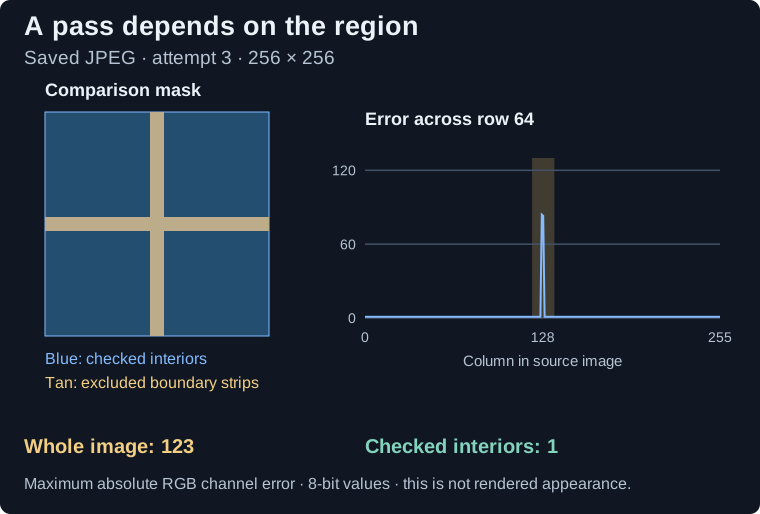
One of the delivered JPEG labels passed its pattern check even though its largest pixel-channel error was 123 levels. The passing result was correct under the chosen comparison: within the selected interiors, the largest error was one level.
Scroll sideways for more columns.
Supplied label
Comparison region
Largest channel error
Result
All three PNGs
Whole image
0
Exact pattern match.
JPEGs, attempts 1 and 2
Whole image / selected interiors
1 / 1
Pass under the JPEG policy.
JPEG, attempt 3
Whole image
123
Recorded diagnostic; not the selected acceptance region.
Same JPEG, attempt 3
Selected interiors
1
Pass under the JPEG policy.
The table keeps the selected comparison and whole-image diagnostic separate.
The comparison mask shades excluded rows and columns. The profile shows error across row 64 of the saved third JPEG; its peak is 84 levels. The whole-image maximum is 123, while the selected interiors reach only 1. This is a pixel diagnostic, not a render of the panel.
The earlier evaluation write-ups, RESULTS.md and ARTICLE_REVIEW.md, called one level the JPEG maximum without consistently restricting it to the interior; COVERAGE.md called it a whole-image maximum. The raw comparison kept the narrower region. The file was readable and the configured comparison passed, but the write-up overstated what had been checked.
The comparison was right. The summary had to name its region.
I would not reuse this mask for a label whose boundary carries information. A narrow stripe, fine text or registration mark could sit in the excluded region. For that task, the acceptance policy must cover those pixels and set a tolerance suited to their use. Increasing tolerance or cropping away an awkward region after seeing a failure would change the requirement.
A detailed brief did not eliminate wrong pixels
A later creation study produced 24 synthetic scenes at four brief depths, from a simple prompt to a detailed brief. Six detailed deliveries received an exact 64 × 64 source-image reference. Five differed from it by 768–4,096 pixels out of 4,096, although their supplied geometry and motion checks passed.
These were unchanged producer deliveries with no feedback or repair attempt. The requested Astra model, the AI producer that built the scenes, had tools disabled and returned a small palette raster that the study’s adapter expanded into PNG. The study summary in the core article records the wider conditions and keeps this cohort separate from the six-panel evaluation.
Exact matching was right for those deterministic patterns, but I would not make it the default for every photographic or compressed texture. I need the brief to identify the reference and what agreement means: exact pixels, selected regions, a declared tolerance, or a visible property requiring a rendered view. Scene Acceptance cannot choose among those meanings merely because a file is named label.png.
Correct source pixels, wrong visible sign
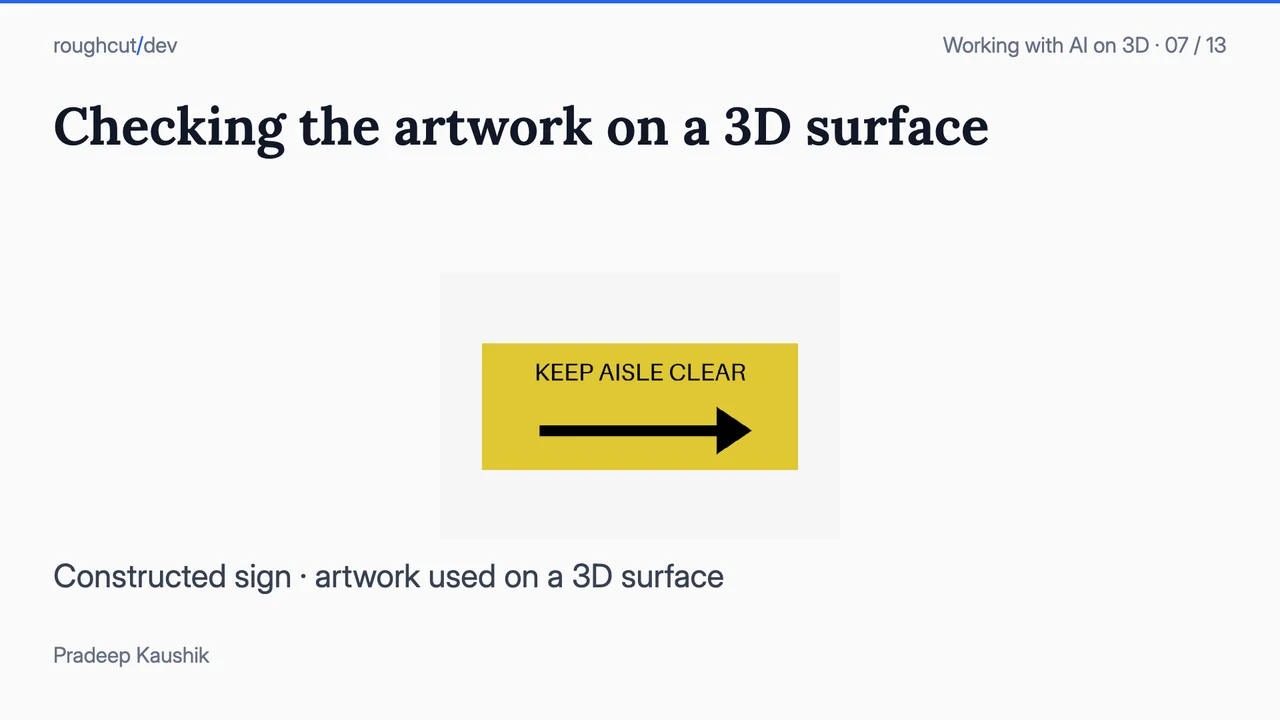
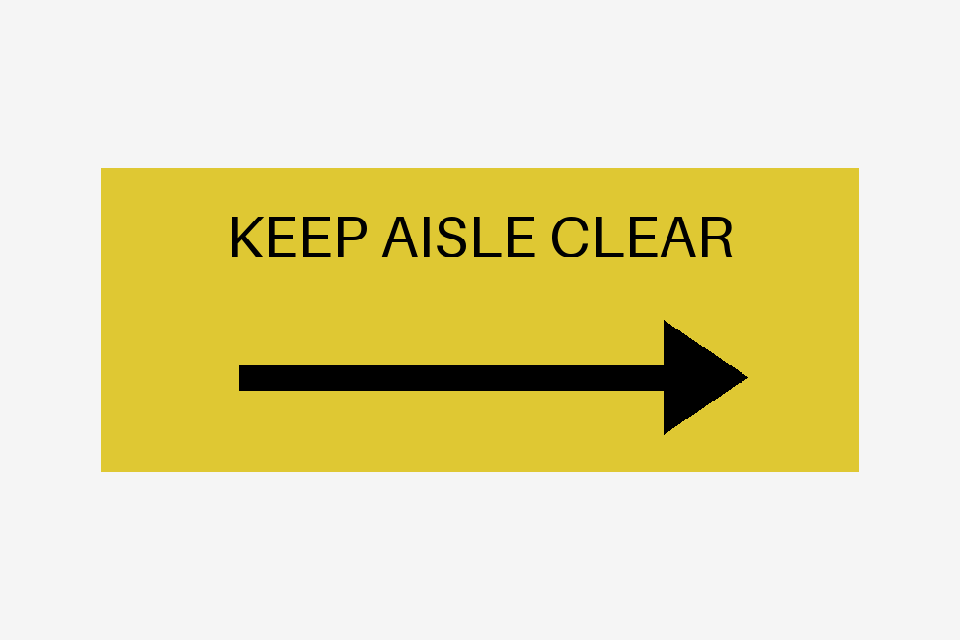
Source-image agreement leaves the final surface open. UV placement, occlusion, scale, lighting and color management can change what the viewer sees. I tested that boundary with a separate constructed sign: KEEP AISLE CLEAR, with an arrow pointing right.
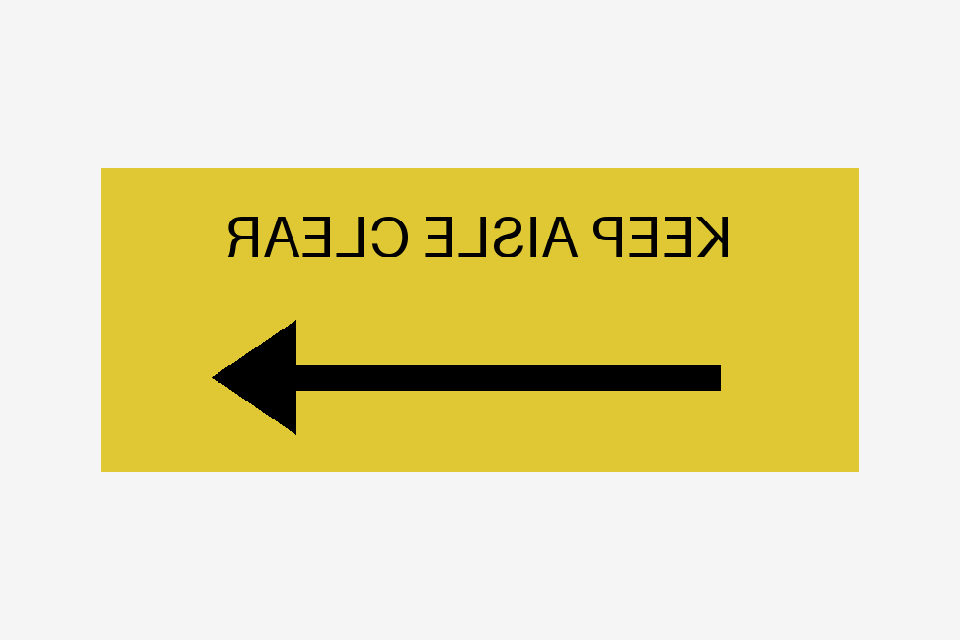
The correct and mirrored signs use identical texture bytes. Both pass the structural and source-pixel checks. Only the saved UV coordinates, which place the image on the sign, differ. The caller, the application that runs the harness, supplied a front render. With it, the optional visual judge, an AI model that reviews supplied views, flagged the reversed lettering and arrow in both repeated reviews.
The arrow’s direction is part of what this sign communicates. Reversing it need not change the sign’s collision shape, but it changes the guidance a viewer receives. For this visual task, that is a consequential failure; it cannot be dismissed as a minor appearance difference because the geometry checks passed.
Correct UVs: visual review consistent, twice.
Mirrored UVs: visual concern, twice.
Actual caller-rendered views of the two saved USD controls. The caller used a CPU renderer; these are diagnostic images, not RTX renders. Both source-image comparisons pass.
Scroll sideways for more columns.
Evidence supplied
Source-pixel check
Visual outcome in two repetitions
Correct sign, front view
Pass
Consistent both times.
Mirrored sign, front view
Pass
Concern both times: reversed lettering and arrow.
Sign hidden by another object
Pass
Unknown both times: the sign is not visible.
No view supplied
Pass
Unknown without a model call.
Show the occluded view that could not be judgedA correctly identified capture can still hide the subject. The judge requested a clear view rather than passing unseen lettering.
The public fixture and results contain six fresh model calls across the three rendered cases, requesting gpt-6-astra; the service did not report the resolved snapshot. The no-view cases used deterministic guards. The verdict from the scripted checks was ACCEPT_FOR_USE in all eight evaluations, two for each condition in the table, including both mirrored-sign runs. With visual review selected, those two deliveries needed review despite the script pass. This is one constructed sign fixture with two reviews per rendered condition, not a detection rate for factory scenes.
I would request a rendered view when the requirement is about visible lettering. The pixel check establishes which source image arrived; the view shows how the scene uses it. The visual opinion remains separate and cannot erase a failed source-pixel requirement.
Read the whole file first, within a stated budget
The pixel comparisons above rely on reading the whole image. Recognizing the format is not the same as doing that. One damaged PNG had enough of a header for Pillow, the Python imaging library, to identify it and report dimensions; Pillow’s Image.open() is lazy, and verification failed only later. The decoding check therefore verifies the file, reopens it and calls load() before reporting successful decoding, and it records the shader attribute, resolved file, byte digest, format and dimensions so the comparison stays tied to the delivered texture. It covers single-frame PNG and JPEG only. A correctly decoded red image still passes the decoder even when the task wants four quadrants, so the reference comparison stays a separate requirement.
Deliberately faulty copies made by my coding assistant tested the evaluator itself. A missing file failed the delivery check, an unreadable file passed binding and file-presence checks but failed decoding, and a readable image with the wrong pattern failed only the pattern comparison, none of which happened in the six submissions.
The controls also give the decoder a deliberately small budget of 1,024 pixels. A readable 33 × 33 PNG exceeds it and returns UNKNOWN; if decoding is required, the overall result is INSUFFICIENT_EVIDENCE. The evaluator declined to look, and nothing is known to be wrong with the image. A brief saying “deliver no more than 1,024 pixels” would make the same image a failed delivery requirement. The number is identical, but it belongs to a different decision.
In release 0.5 of Scene Acceptance, the image_pixels check makes the comparison region and tolerance explicit. It accepts included or excluded rectangles, a declared black-and-white mask, and maximum and per-channel mean error limits, and its report retains the selected pixel count, mask hash, tolerances and whole-image diagnostics. The comparison is on decoded RGB channels with no color-space conversion. The development package, an unreleased 0.7 snapshot of Scene Acceptance, adds an explicit sRGB, linear RGB8 or ICC policy and a choice about applying EXIF orientation, which the caller has to make before comparing. The JPEG results above keep their original decoded-channel policy. Separate image policy limits apply when an image is too large, or uses an unsupported color mode, for exact comparison.
The v0.1 companion includes the original texture controls, their reports and the harness source needed to run them, but not the later six-panel or detailed-brief studies.
With Python 3.12 and the v0.1 companion extracted, run these commands from its root:
Choose a new output directory for each run. The runner refuses to overwrite previous results and verifies the frozen input hashes before and after evaluation. In summary.json, the texture-* entries compare the delivery verdict, integrated verdict and direct Pillow observation. Each case also has the complete acceptance report.
The texture matrix contains eleven constructed cases, created and run with coding-assistant help under my direction, using OpenUSD 25.11 and Pillow 12.3.0. They show how the evaluator behaves on these cases; they are not a sample of agent-generated textures.
Put the comparison region in the result
For the JPEG case, I would keep the mask and tolerances with the reference, and report the interior and whole-image diagnostics with their names intact. “Pattern passed” was too easy to read as a statement about pixels the check had excluded. Where the requirement is about visible lettering, I would also request a rendered view, because the pixel check establishes only which source image arrived.
Disclaimer: The views and opinions expressed in this account are those of my own and do not represent those of my employer, NVIDIA.