A 3D scene can contain the material I asked for while an object uses something else. A textured surface can also point to an image file that was never delivered. Before judging how the scene looks, I need to know whether each surface is connected to the right material and whether its required files arrived.
In Scene Acceptance, my tool for checking saved 3D deliveries, I tested those connections with altered copies of a small panel scene. One used the wrong material; others had missing or undeclared texture files. A material defines how a surface looks through a shader, which uses inputs such as texture images. These copies exposed a bug in the checker as well as the delivery conditions I wanted it to catch.
A material can exist without reaching the surface
The controlled scene contains a single triangular panel and two materials, Coating and Other. The requirement is for the panel to use Coating, which the scene’s OpenUSD (USD) file records as a material binding on the panel. Binding it to Other fails the check even though Coating is still present.
If a surface carries a label or helps distinguish equipment, the wrong material can change what a person understands from the scene. Some surface detail may be unnecessary for a shape-only study, but this test explicitly required the assignment. Omitting that requirement from the checker would not turn the wrong binding into an agreed simplification.
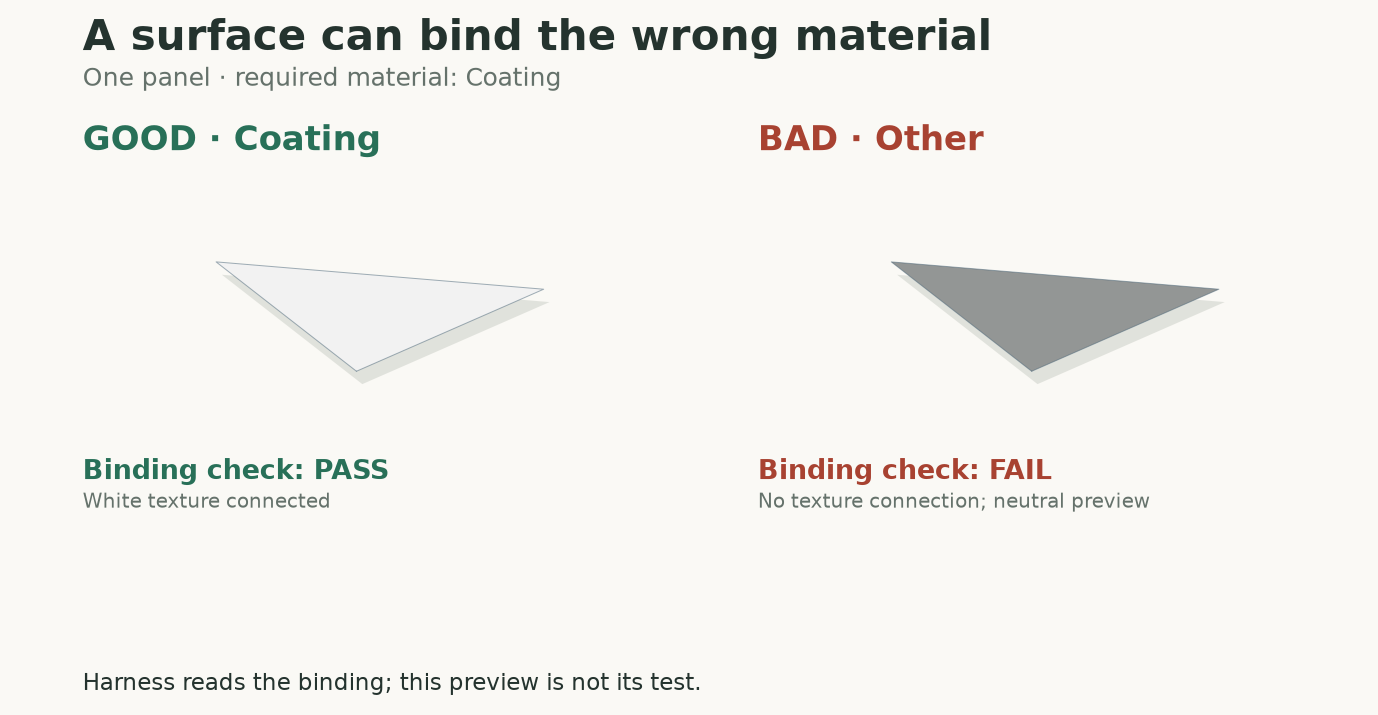
The panel must use Coating. The bad delivery binds Other, even though Coating still exists in the scene. This diagnostic preview uses the delivered white texture on the left and a neutral display fallback on the right. The harness catches the saved binding mismatch; it does not compare these image pixels.
The check uses OpenUSD’s resolved material-binding API, then resolves the selected surface source. A text search for the material name would find Coating in the bad delivery and pass it. I would keep using the resolved binding when an asset uses inherited bindings or several materials.
The file reader skipped a texture reference
The first pack replay, a run over test scenes with fixed expected decisions, gave three false acceptances: two cases with a missing texture file and one with an undeclared texture dependency. The harness’s reader, the code that lists the files a delivery depends on, missed a path authored on a shader attribute. The layer-level USD call it relied on did not enumerate that path, so the later checks never got the reference they needed.
My coding assistant fixed it under my direction by inspecting asset-valued attributes, the ones that hold file paths, explicitly before stage composition, when USD assembles the scene from its files. The fixtures and expected decisions stayed fixed, and all 22 pack cases then matched their expectations. The fix is in Scene Acceptance release 0.3.0, and the repository keeps the first reports alongside the corrected ones.
That failure changed how I test delivery. Checking that the right material reaches the intended surface is only half of it; I also want a control that exercises the path from a shader reference to a local file.
A delivered file can still fail to decode
The next probe changed only the bytes of pixel.png. One bundle contains a valid tiny PNG; the other contains a plain-text sentence with the same filename. Their USD scene hashes and bindings are identical. Both passed the recorded v0.3 delivery contract with ACCEPT_FOR_USE. A separate Pillow decode, using the Python imaging library, read the valid PNG and raised UnidentifiedImageError for the text file. Pillow already could tell; v0.3 just didn’t put that answer into the verdict. Release 0.5 does, through its textures.decode pack. The texture follow-up picks up from there, because a readable image can still be the wrong picture or look different under another renderer, lighting setup or color-management policy.
What the evaluation captures
In the pack replay, the materials pack compares resolved bindings, surface shader IDs and referenced-file presence. Binding and shader checks use default time, the values authored without animation. The pack itself does not decode images, inspect their contents, validate UVs or render the scene.
The harness core also checks dependency admission, whether each referenced file is declared and local, before these comparisons. An undeclared dependency makes coverage unresolved, recorded below as insufficient evidence; the material pack doesn’t get to add it silently to the contract.
These recorded cases show how those conditions become decisions. All five are folders under evaluation/packs-v1/fixtures:
Scroll sideways for more columns.
Case
What changed
Recorded decision
material_correct
Required binding, surface shader and referenced file are present.
Accept.
material_wrong_binding
Panel resolves to Other instead of Coating.
Reject.
material_missing_texture
The shader still references pixel.png, but the file is absent.
Reject, with incomplete dependency evidence also retained.
undeclared_texture
A referenced file wasn’t declared in the contract.
Insufficient evidence.
omitted_material_requirement
Wrong binding, but no binding requirement selected.
Accept under that weaker contract.
For an accepting application, I would make the binding and delivery check required. The contract marks each check required or advisory, and an advisory failure stays visible but does not block that contract’s acceptance.
The material check on the Astra assembly
I also applied the binding check to the Astra crank-slider, which an AI agent built from one brief. It is a recorded producer delivery rather than a constructed control. Four named surfaces in its acceptance contract and their UsdPreviewSurface shader IDs, USD’s standard preview shader, passed in the assembly report. That covers four of the scene’s seven materials, mapped to the delivered names after submission. Confirming that the orange slider looked orange needed the delivered render, and full USD shader compliance stayed unverified because the checker installation could not resolve the standard shader definitions.
Give the pack a specific surface requirement
For the panel comparison, the contract requires /World/Looks/Coating to be bound to /World/Panel, with a UsdPreviewSurface surface shader and its referenced texture delivered.
The complete example is material_correct/contract.json on GitHub. This is its material check entry inside the checks array:
The outer contract pins the materials pack to 1.0.0, declares pixel.png as an allowed dependency and selects native USD format checks. The check ID appearance.delivery is a label chosen for this fixture. The empty purpose and render-context values select the default binding purpose and universal surface context. For another application, I would set those to the context it consumes and keep the expected shader ID explicit.
Copy the complete contract before adapting it, since the fragment above is one check. Release 0.5 and later enforce exact pack versions, so a 1.0.0 contract runs unchanged only on the v0.3.0 download; for a current install, python -m scene_acceptance.contract_upgrade proposes a version-only upgrade in a copied bundle for you to review.
Run a correct delivery and a wrong binding
Install the project using the core project’s setup instructions, activate its environment and stay in the extracted folder. The material pack uses the base OpenUSD installation; it needs no renderer or NVIDIA dependency.
The first accepts. The second rejects with exit code 2. Open the respective report.html files or read result.json, and use a new output directory for each run. Replace the fixture name in the CLI command to inspect another case.
The rejection includes this finding; these are selected fields from the recorded result:
The finding sits under the check’s evidence.observations.findings. The caller can return the object path with its expected and observed bindings to the producer; the harness never rebinds the surface itself.
This probe uses the public v0.3.0 fixtures. To replay it, follow the core installation steps for v0.3.0, then from the extracted folder with its environment active:
The output summary.json contains valid_texture and unreadable_texture, each with the harness verdict and png_decodes. The same runner replays two temporal probes from the motion article, and it checks every saved input against its frozen hash before and after evaluation.
Version differences in dependency checks
Referenced-file inspection in v0.3 covers authored asset values across the delivery, including time samples, so it can report a file outside the named binding, and releases 0.5 and 0.6 behave the same way. The development package, an unreleased 0.7 snapshot of the harness, instead follows the shaders and textures connected to each selected material and attributes a missing file to the material that uses it. By default, a renderer library such as OmniPBR.mdl that cannot be resolved locally stays unknown; since release 0.5 a caller, the application running the harness, can vouch for it through an approved runtime-dependency policy, while ordinary missing textures still fail.
Keep a missing-file control beside the good bundle
For an application that will open the scene, copy the complete contract, name the surfaces and bindings it needs, and select the shader context it consumes. Keep a correct bundle, a wrong binding and a referenced file removed from disk. The missing-file cases exposed the reader mistake in the first replay, even though the material code itself looked reasonable.
When one of those fails, I want the file check to name the missing dependency and the binding check to name the surface and the expected material, because those are repairs a producer can act on. For textured content I would also require decoding, and the core harness article places those source-image checks beside optional rendered review.
Disclaimer: The views and opinions expressed in this account are those of my own and do not represent those of my employer, NVIDIA.