For an animated 3D scene, reaching the destination is only part of the job. A brief may also specify how long the move should take and where the object should be along the way. The saved file’s timeline tells the software how to play that motion; I need the checks to assess it in the seconds and positions the task requires.
I used a simple panel animation to test that distinction in Scene Acceptance, my acceptance harness for checking saved 3D deliveries. The brief gave the panel two seconds to move one metre. My first motion contract, which specifies the requirements for the checks, accepted a version that finished in about 0.083 seconds.
In the constructed test, only the clock rate in the saved OpenUSD (USD) file had changed. My contract named its sample times in time codes, the timeline’s numeric positions, and never asked how many seconds those codes covered, so every sampled position still matched. The fix I chose checks the duration and the positions in elapsed seconds and leaves the clock rate to the producer that builds the scene, because a brief written in seconds does not care whether the file counts one time code per second or 24.
The clock-only change passed
The fixture, a constructed test scene, contains a triangular panel at /World/Panel. Its origin should move along X from zero to one metre over two seconds. The original sample contract, from harness release v0.3.0, checks three world positions, including movement inherited from parent objects: zero at time code 0, half a metre at time code 1 and one metre at time code 2. The stage, USD’s term for the composed scene, declares one time code per second, so in this file those codes happen to be seconds. USD leaves that relationship to the file; OpenUSD’s stage API exposes the timing metadata and the interpolation setting.
My coding assistant built these fixtures and the evaluator, and assessed the results, under my direction. During an adversarial review, it copied the passing fixture and changed only timeCodesPerSecond from 1 to 24. The positions, sample times and contract stayed the same. Both evaluations returned ACCEPT_FOR_USE for the selected checks.
Scroll sideways for more columns.
Saved scene
Time-code rate
Duration from time code 0 to 2
Recorded decision
Original passing fixture
1 per second
2 seconds
Accept.
Constructed clock-rate change
24 per second
About 0.083 seconds
Accept.
USD did what it was told. The gap was in my contract, and this scene was built to test it; no agent made the mistake. For a brief stated in seconds, I need the check to read the clock rate and enforce a duration. Version 1.0.0 of the motion pack, the reusable group of motion checks the contract selected, had no parameter for either. Its report even recorded the new rate of 24.
If an animation is used to explain how operations are coordinated, incorrect timing could misrepresent their relationship. A still image would not expose that. The duration was part of this request, so it needed a direct check; the agent could still choose a different clock representation that preserved the required timing.
The fix: check duration and elapsed seconds
I added motion.timing as a separately selected pack in the harness’s 0.4 development revision instead of changing the original motion pack, so contracts already written to compare time codes keep their meaning. The new pack has a clock check for the authored stage duration, the start-to-end time the saved file declares, with an optional exact rate, and a positions check whose samples are elapsed seconds from the authored stage start.
For this brief, I require two seconds and the origins at zero, one and two elapsed seconds. A rate of 24 is fine when its time range and keyframes are rescaled together; changing only the rate still fails.
Scroll sideways for more columns.
Submitted motion
New timing result
Reason
Original two-second animation
Accept.
Duration and sampled origins match.
Clock changed to 24; keyframes unchanged
Reject.
The stage spans about 0.083 seconds.
Clock and keyframes rescaled to 24
Accept.
The same requested motion spans two seconds.
Stage extended to two seconds; early keyframes retained
Reject.
Duration passes, but the panel is already at the end at one second.
All 17 timing controls, the constructed test cases for this pack, including these four, matched their expected decisions.
Requiring 24 time codes per second would have been an easy response to the first failure. It would also have rejected a valid one-code-per-second delivery. Checking elapsed seconds lets the producer choose either clock while the two-second requirement stays fixed. A calling application, the software or agent that invokes the harness, can still add an exact time_codes_per_second requirement to the clock check when its own tool does need 24.
The fix had its own hole, in the table’s last row: duration passes there, and only the one-second position catches it. Missing or unusable clock metadata comes back unresolved, which still blocks acceptance but tells the application to go and get a usable clock instead of treating an unmeasured duration as a known violation.
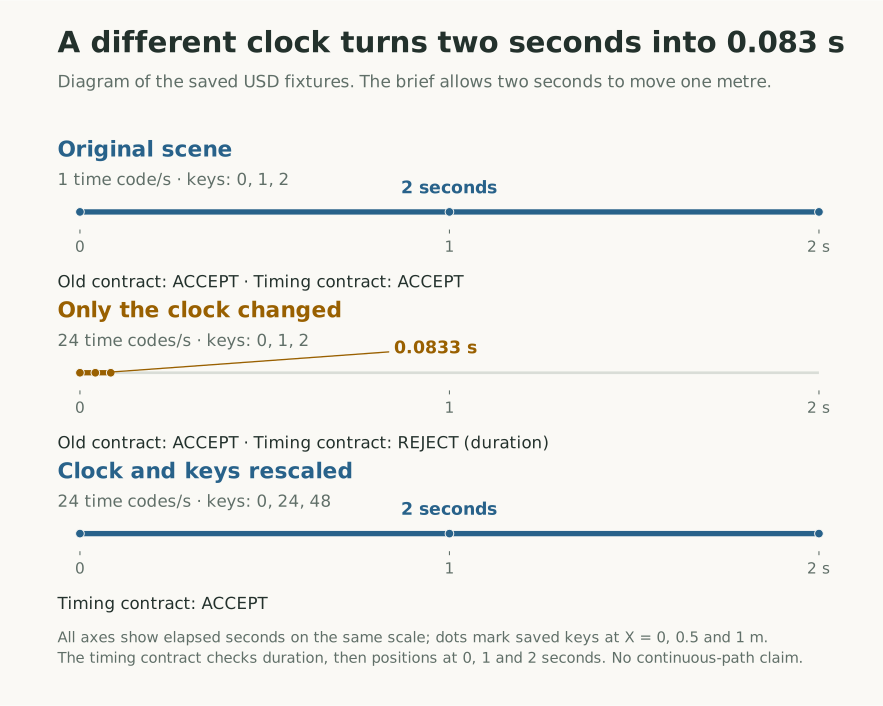
Diagram of the retained fixtures and results. Dots mark the saved keys; each scene moves the panel from X = 0 to X = 1 metre. Changing only the clock compresses the elapsed time. The timing contract rejects that duration before checking positions, so its position result remains unresolved.
Test the gap between samples
The original pack’s position check does catch a wrong position at a time it names. The supplied motion_wrong_midpoint fixture puts the origin at X = 0.8 m instead of 0.5 m at time code 1, and its report identifies /World/Panel, the time, and the expected and observed positions. The companion endpoints_miss_midpoint contract accepts that same motion because it selects only the start and end.
Both v0.3 sample contracts use a one-micrometre tolerance, which suits an exact synthetic test and not measured geometry. Position tolerance applies to X, Y and Z separately, so a 1 mm allowance on each axis can admit a point about 1.73 mm away; the connection check uses straight-line distance instead.
Play or pause the replay. The solid panel follows the saved USD motion; the dashed outline follows the reference path. At one second, the bad panel is 300 mm ahead. Both panels still finish correctly, and the required midpoint check catches the error. Playback is slowed two times, with holds at the start and end; this is a projection of saved transforms, not a simulation.
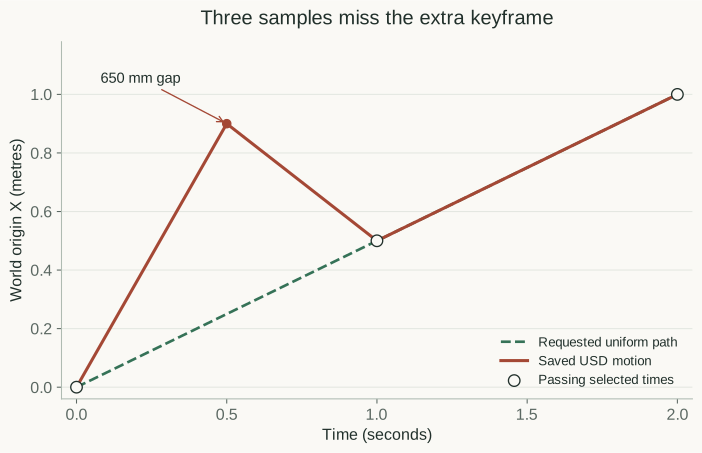
What the check cannot see is the motion between the times it names. A separate probe makes that visible: a constructed scene that tests the original contract between its sample times. The probe’s brief requires uniform translation. The candidate has the correct X values at time codes 0, 1 and 2, but adds a keyframe at 0.5 with X = 0.90 m, where uniform translation would put it at 0.25 m.
Two evaluations use identical scene bytes:
Scroll sideways for more columns.
Probe
Required times
Observed decision
between_samples
0, 1, 2
ACCEPT_FOR_USE; the extra excursion is unexamined.
inspect_added_time
0, 0.5, 1, 2
REJECT; the half-second position differs by 650 mm.
The second probe passes at every time in the three-sample contract. The added half-second check finds a 650 mm discrepancy.
Adding the half-second sample caught this excursion only because the probe put it there, and a sample I don’t think to add can hide the next one just as well. For piecewise-linear translation like this, a specialized check could compare every authored segment with the requested line; the sampled pack used here doesn’t. Rotation needs a different argument. A rotating door can keep its origin fixed while sweeping through nearby equipment; every position sample could pass that case.
The assembly’s motion required more than a clock check
The panel controls isolate translation and timing. Unlike them, the recorded agent-built crank-slider was a real delivery. Astra, the AI agent that served as producer, built it from a written brief and submitted an editable USD scene plus a GLB file for its browser viewer. In it, a rotating wheel drives a rod and sliding block, with the rod pinned at each end, so it needed a connection check too. Rotation produced a different failure between the planned inspection times.
Playback of the final delivered GLB. The crank rotates and the slider follows its guide. The corrected delivery is shown here; the intermediate export failure is retained in the producer's logs.
The assembly brief required one crank cycle in four seconds while the linkage stayed connected. Its harness report, from a profile of selected checks I ran on a copy of the USD, passed a four-second duration check through motion.timing. My coordinating assistant, which prepared the brief and ran the task, separately checked the pin relationships and phase at nine elapsed times.
The producer’s initial failure log records nearly 70 mm of rod-to-pin separation caused by angle interpolation between frames. The demonstration note records its correction and denser readback. That check was the producer’s, outside the harness. A duration pass could never have shown whether the rod stayed on its pin, so a reusable assembly profile needs the elapsed-time requirement and linkage measurements at the subframes that matter.
Checks for a new brief
The timing pack has changed since these tests. Harness release 0.5’s motion.timing 1.1.0 also accepts an authored framesPerSecond as the effective rate, tolerates floating-point rounding at the final time, and no longer fails keys that sit outside playback just for being there. A wholly implicit clock still comes back unresolved.
The development package, an unreleased 0.7 snapshot of the harness, adds two related checks to brief.measurements, the pack for values a brief states directly: relative_motion compares world displacement between two elapsed times, and rotation_rate compares every linear segment of one authored scalar rotation with a declared rate. relative_motion says nothing about the path between its two times, and rotation_rate reads only the authored local angle, not the composed world rotation or the space the part sweeps. The swept-clearance check bounds the clearance of supported translating geometry, treating parts as open surfaces or closed solids as its policy declares; a rotating part like the door above still comes back unknown. I have not rerun the panel probes against these checks.
Reproduce the panel controls
To reproduce the clock-only change, follow the core article’s installation steps for v0.3.0. From that extracted folder with its environment active, create a new temporary copy:
The first evaluation rejects; the second accepts. The contract and pack settings show the duration_s, tolerance_s and elapsed_s fields. These fixtures pin motion.timing 1.0.0, so on release 0.5 or later each timing check returns an error for the version mismatch. Pass each fixture through python -m scene_acceptance.contract_upgrade into a new folder first; the 0.6.0 timing guide has the commands.
To reproduce the between-samples probe, return to the original extracted v0.3.0 folder and reactivate its .venv. Install that project’s pinned experiment dependencies and run:
The same runner executes the texture probes from the materials article. Inspect summary.json and the motion reports under the new output directory. The between-samples plot uses positions read back from the saved USD.
The controls I would keep
For a new animation, I would keep four timing controls: the intended motion, a clock-only change, an equivalent rescaling, and an animation that finishes early inside a longer stage range. They expose the specific contract gaps I found here; they are not a detection rate for arbitrary animation. If all four come back as expected, I know the contract enforces the seconds the brief asked for while still letting the producer pick how to count them.
When the job also depends on a path or connection, I would name that relationship separately and keep the inspected times with its result. A correct duration leaves those questions open.
Disclaimer: The views and opinions expressed in this account are those of my own and do not represent those of my employer, NVIDIA.